
Life Safety Binder to Digital Audit Platform: A Step-by-Step SNF Compliance Upgrade Guide

It is 7:14 a.m. on a Tuesday when the surveyor walks through the front door. The administrator is in a morning standup. The maintenance director is on the roof checking a HVAC unit. The life safety binder is in the office, third shelf from the bottom, held closed by a thick rubber band that snapped and was replaced sometime last spring.
The surveyor does not announce a focus area. She asks for documentation on the last fire drill, the generator load test from the prior month, and the sprinkler inspection report with any noted deficiencies. She wants to know when those deficiencies were resolved, documented, and by whom. She is looking for a thread, and she is very good at finding it.
What happens next in that facility depends almost entirely on whether the documentation in that binder tells a coherent, complete, contemporaneous story. Not whether the work was done. Whether the documentation proves it was done, in the right format, at the right cadence, with no gaps a surveyor can cite under a K-tag.
This guide is for maintenance directors, plant operations managers, and SNF administrators who already know the binder is not enough. It is a step-by-step walkthrough of how to move from paper-based SNF life safety compliance documentation to a digital maintenance management system that does not just store records but audits them, so the gaps are found before the surveyor finds them.
Why the Paper Binder Fails: The Hidden Structural Problem
The paper binder is not a bad idea. It is a reasonable solution to a documentation requirement that has been growing in scope and complexity for decades. The problem is that the binder is a storage system, not an audit system. It can hold a completed inspection form, but it cannot tell you that the form is missing a required field, that the cadence slipped by three weeks, or that the generator test from last quarter never had the kW load reading entered.
Those gaps are the ones that produce K-tag citations. And they are structurally invisible to the person maintaining the binder, because the binder has no mechanism for self-review.
The Documentation Gap Is Not a Laziness Problem
SNF maintenance directors are not cutting corners. They are managing hundreds of recurring compliance tasks across fire systems, electrical systems, HVAC, medical gas, emergency power, and environmental equipment, often with a lean team, limited budget, and no dedicated compliance staff. The CMS Nursing Home Requirements of Participation are extensive, and the life safety chapter alone references NFPA 101 and NFPA 99 across dozens of asset categories with varying inspection frequencies.
When a form gets filed incomplete, it is usually because the technician who did the work did not have the exact required fields in front of them at the time of completion. When a cadence slips, it is usually because there is no automated reminder system, just a wall calendar or a mental note. When a deficiency goes unreconciled in the documentation, it is often because the contractor report was filed but never cross-referenced against the original inspection log.
These are system failures, not people failures. The binder cannot fix them because the binder has no intelligence. It is a folder.
What Surveyors Are Actually Looking For
Understanding the surveyor's methodology reframes the entire documentation problem. CMS surveyors and state inspectors are not conducting random audits. They are working through the CMS State Operations Manual Appendix PP, which maps specific regulatory tags to specific documentation expectations.
K-tags are the life safety code citations under the environment of care requirements. They are issued when a facility cannot demonstrate compliance with a specific NFPA 101 or NFPA 99 requirement, or when the documentation trail is incomplete, inconsistent, or missing. Common K-tag citation areas include:
- Fire drill documentation, particularly coverage of all shifts including nights and weekends
- Automatic sprinkler system inspection, testing, and maintenance records with deficiency resolution tracking
- Emergency generator testing logs with required load readings and transfer time documentation
- Corridor and door hardware inspections, including self-closing and positive-latching verification
- Medical gas system inspections and alarm testing records
- Smoking policy documentation and designated area compliance records
- Portable fire extinguisher inspection logs with monthly and annual records
The surveyor is looking for a complete, contemporaneous record. "Contemporaneous" is the critical word. A record completed the day before the survey is not contemporaneous. A record entered retroactively into a log that was previously blank raises immediate credibility questions. The documentation must exist at the time the work was done, or the documentation does not count.
This is the structural advantage of a digital platform with timestamped, geo-tagged, or kiosk-authenticated completion records. The timestamp is built into the system. Retroactive entry is either impossible or flagged. The contemporaneous standard is met automatically.
Mapping Your Current State: The Pre-Migration Audit
Before any platform is evaluated or purchased, the first step is an honest inventory of what the current binder system actually contains, what it is missing, and what the gap looks like from a surveyor's perspective. This is uncomfortable work, but it is far less uncomfortable than discovering the gaps during an unannounced visit.
The Five-Category Documentation Inventory
A useful pre-migration audit organizes the facility's documentation into five categories, each of which maps to a distinct K-tag risk area:
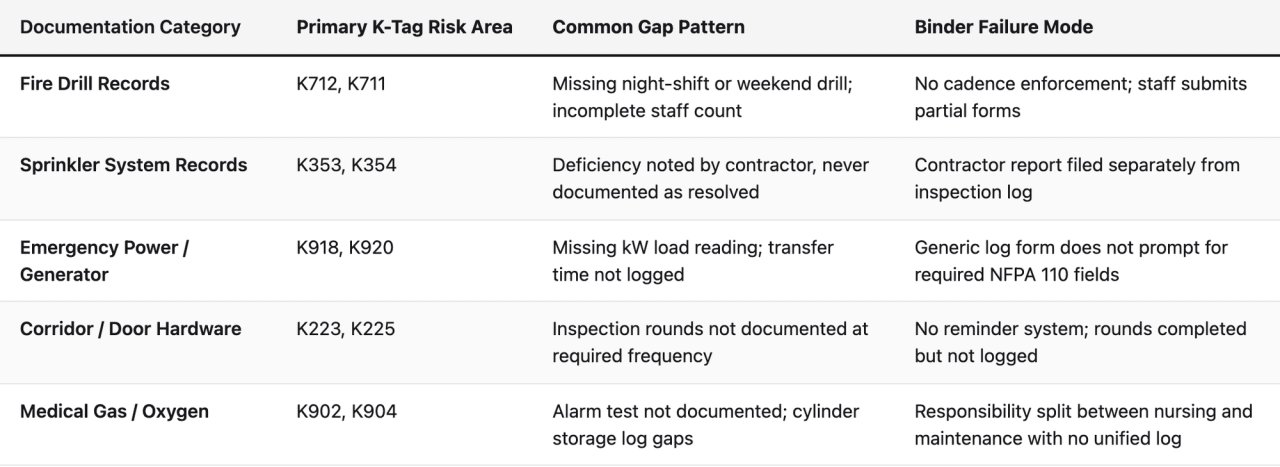
Walk through every active file in the binder and score each category as complete, partially documented, or critically deficient. Be honest. The goal is not to feel good about the current state. The goal is to understand exactly what a surveyor would find today, so that the migration plan can prioritize the highest-risk gaps first.
Identifying Your Cadence Gaps
Beyond completeness, the pre-migration audit needs to surface cadence gaps: tasks that are required at a specific frequency (daily, weekly, monthly, quarterly, annually) where the documentation shows inconsistent completion. Cadence gaps are particularly dangerous because they are easy for a surveyor to spot simply by scanning the date column of any log.
Pull the last 12 months of documentation for each asset category and look for:
- Months where a required monthly task has no entry
- Quarterly tasks completed late by more than two weeks
- Annual inspections where the contractor report exists but the facility's internal follow-up documentation does not
- Any period where a change in maintenance staff corresponds to a documentation gap
This cadence mapping exercise becomes the baseline against which a digital platform will be measured. If the platform cannot enforce cadence and alert when tasks are overdue, it is not solving the core problem. It is just a digital folder instead of a paper one.
Selecting the Right Digital Platform: What CMMS Is and Is Not
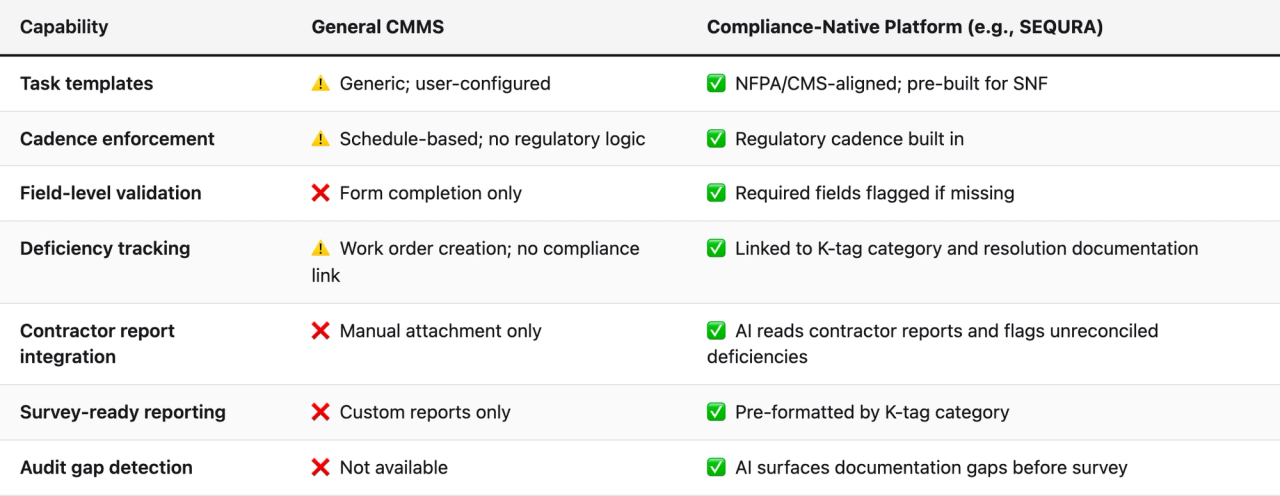
The phrase CMMS software for skilled nursing facilities gets used broadly, and it covers a wide range of products with very different capabilities. Understanding the distinction between a general-purpose CMMS and a compliance-native platform matters significantly when the goal is CMS survey readiness rather than just work order management.
General CMMS vs. Compliance-Native Platform
A general-purpose facilities maintenance management platform is designed to manage work orders, track asset maintenance history, and schedule preventive maintenance tasks. These are valuable capabilities. But they are designed for equipment uptime, not documentation compliance. The task templates in a general CMMS are usually generic. They do not know that a generator test log for a SNF must include transfer time, voltage, frequency, and kW load to satisfy NFPA 110 requirements. They do not flag that a fire drill completed on a Tuesday morning at 10 a.m. may not satisfy the CMS requirement for drills across all shifts.
A compliance-native platform, by contrast, is built around the regulatory framework. The task templates are derived from NFPA 101, NFPA 99, NFPA 110, and CMS Requirements of Participation. The required fields in each form correspond to what a surveyor expects to see. The cadence rules are set by regulation, not by the user's preference. And the audit layer reads completed records against regulatory expectations, not just against the question of whether a task was marked complete.
What to Ask During Platform Evaluation
When evaluating any life safety audit software or compliance platform for a SNF environment, the evaluation questions should go beyond features and pricing. The questions that matter most are:
- Are the task templates built by people with life safety consulting backgrounds, or by software engineers using generic regulatory text?
- Does the platform enforce required fields at the point of entry, or does it accept partial completion?
- How does the system handle contractor-submitted inspection reports? Are they cross-referenced against facility records, or just attached as files?
- Can the platform generate a documentation package organized by K-tag category that a surveyor can review?
- Does the system flag cadence gaps proactively, or does a manager have to run a report to discover them?
- How does the platform handle multi-shift fire drill documentation to ensure all required shift coverage is logged?
- Is there a kiosk or mobile completion option for technicians who do not work at a desk?
The answers to these questions will separate compliance-native platforms from general-purpose work order tools, regardless of how either is marketed.
The Step-by-Step Migration: From Binder to Digital Platform
The migration from a paper binder to a digital compliance platform does not have to be disruptive or happen all at once. A phased approach, organized around K-tag risk priority, is both practical and strategically sound. The goal is to close the highest-risk documentation gaps first, then build completeness over time.
Phase 1: Platform Setup and Template Configuration (Weeks 1-2)
The first phase is entirely about configuration, not data entry. Before any historical records are migrated or any new inspections are logged digitally, the platform must be set up to match the facility's specific asset inventory, staff structure, and regulatory obligations.
Key setup tasks in Phase 1 include:
- Asset inventory entry: Every major life safety asset needs to be entered into the platform. This includes fire alarm panel and zone information, sprinkler system zones and riser locations, emergency generators (number, capacity, transfer switch configuration), medical gas manifolds and alarm panels, corridor door hardware, and portable fire extinguisher locations. The platform's task templates are linked to specific assets, so the asset inventory is the foundation.
- Staff role assignment: Assign completion responsibility for each task category to specific roles or individuals. Generator tests may be the maintenance director's responsibility. Monthly extinguisher checks may be delegated to a technician. Fire drill coordination may involve both maintenance and the DON. These assignments should match actual operational responsibility, not just who is available.
- Template review and customization: Review the platform's pre-built NFPA and CMS task templates against the facility's state-specific requirements. Some states have inspection requirements that exceed the federal baseline. The template library should be adjusted to reflect these requirements where applicable.
- Cadence calendar setup: Configure the compliance calendar to reflect the required inspection frequency for each asset and task category. The platform should generate automated reminders and overdue alerts based on this calendar.
Phase 2: Historical Record Migration (Weeks 2-4)
Historical record migration is the most time-consuming part of the transition, and it is also where the pre-migration audit from Phase 0 becomes essential. The goal is not to digitize every piece of paper in the binder. The goal is to establish a 12-month historical baseline in the digital system that a surveyor could review.
Prioritize migration in this order:
- Fire drill records for the past 12 months (all shifts, all quarters)
- Sprinkler system quarterly and annual inspection reports, including any noted deficiencies and resolution documentation
- Generator test logs for the past 12 months, with kW load readings
- Annual life safety inspection reports from contractors
- Any outstanding corrective action documentation for previously cited deficiencies
During migration, the pre-migration audit gaps identified earlier will become visible. Records that were missing from the paper binder are also missing from the digital system. Do not fabricate or backdate records to fill these gaps. Instead, document the gap explicitly in the system with a corrective action note and a plan for remediation. A transparent gap with a documented corrective action is significantly less damaging during a survey than a gap that appears to have been covered up.
Phase 3: Go-Live on New Inspections (Week 3 Onward, Parallel Run)
Beginning in Week 3, all new inspections, rounds, and compliance tasks should be completed and documented in the digital platform rather than in the paper binder. This parallel run period, where the binder still exists but is no longer the system of record, typically lasts two to four weeks and serves two purposes.
First, it allows staff to build familiarity with the platform's interface without the pressure of it being the only system. Second, it creates an overlap period where any platform configuration issues can be caught and corrected before the paper backup is fully retired.
During the parallel run, the maintenance director should review every completed digital record at the end of each week to confirm that required fields are being populated correctly, cadence alerts are firing on schedule, and staff are comfortable with the kiosk or mobile completion workflow. Any form fields that are consistently being left blank should trigger a brief staff training session on why that field is required and what a correct entry looks like.
Phase 4: Contractor Report Integration
One of the most commonly overlooked steps in SNF compliance digitization is the integration of contractor-submitted inspection reports. The sprinkler company, fire alarm company, generator service contractor, and elevator inspector all submit reports after their visits. These reports often contain deficiency notations that require facility follow-up. In a paper binder system, these reports are typically filed and never cross-referenced against the facility's own inspection logs.
In a compliance-native platform, contractor reports are uploaded and cross-referenced. Any deficiency noted by a contractor should automatically generate a corrective action item with an assigned owner, a due date, and a documentation requirement for resolution. Until that resolution is documented, the deficiency remains open and flagged in the system. This closed-loop deficiency tracking is one of the most significant structural improvements over a paper binder, and it directly addresses one of the most common K-tag citation patterns.
Phase 5: The Internal Audit Cycle (Ongoing)
Once the platform is fully operational, the maintenance director should establish a monthly internal audit cycle using the platform's gap detection and reporting tools. This is the point where a compliance platform earns its keep as a preventive maintenance software equivalent for documentation, not just for equipment.
The monthly audit cycle should include:
- A review of all overdue tasks for the prior month, with root cause documentation
- A review of all open deficiencies and their resolution status
- A fire drill coverage check to confirm all required shifts have been documented in the current quarter
- A generator log review to confirm kW load readings were captured for all tests
- A review of any AI-flagged documentation anomalies or gaps surfaced by the platform's audit layer
This monthly cycle, conducted consistently, creates the documentation discipline that makes an unannounced survey a manageable event rather than a crisis.
K-Tag Documentation: What Each Record Actually Needs to Contain
Understanding K-tag documentation at the field level is essential for anyone configuring or using a compliance platform in a SNF environment. Many documentation failures happen not because the inspection was skipped, but because the completed record is missing a specific element that the K-tag standard requires.
Fire Drill Records: The Shift Coverage Requirement
CMS requires that fire drills in SNFs be conducted on each shift. The documentation for each drill must include the date, time, shift, number of staff participating, the building area covered, the response of residents, and any deficiencies observed during the drill. The "shift" notation is critical: a drill completed at 9 a.m. does not satisfy the night-shift requirement even if it is otherwise complete.
Common documentation failures in fire drill records include:
- Drills documented without specifying the shift designation
- Staff count recorded as a total number without shift-specific breakdown
- Drills conducted but not documented until the following day (contemporaneous standard failure)
- Missing documentation for any quarter, particularly Q4 when holiday staffing disrupts scheduling
A digital platform with a fire drill template that enforces shift designation, requires a staff count field, and timestamps completion at the moment of entry addresses all of these failure patterns structurally.
NFPA 101 Inspection Logs: The Sprinkler Deficiency Chain
The NFPA 101 Life Safety Code requires quarterly inspections of automatic sprinkler systems, with annual full inspections. The documentation chain for sprinkler compliance is more complex than most other K-tag categories because it involves both facility-generated records and contractor-submitted reports, and because deficiency resolution must be documented separately from the original inspection report.
A complete sprinkler documentation chain for any given inspection period includes:
- The contractor's inspection report, dated and signed
- A facility acknowledgment that the report was received and reviewed
- If deficiencies are noted: a corrective action record with the deficiency description, the assigned corrective action, the responsible party, and the completion date
- A follow-up verification record confirming that the corrective action was completed and the deficiency was resolved
In a paper binder, step 3 and step 4 are the ones that most commonly disappear. The contractor report is filed. The deficiency is noted. The work is done. But the documentation of what was done, when, and by whom never makes it into the binder. A surveyor reviewing the sprinkler file sees an open deficiency with no resolution documentation and issues a citation.
Generator Testing: The kW Load Reading Problem
NFPA 110, which governs emergency power supply systems, requires that monthly generator tests include documentation of the load applied during testing, measured in kilowatts. This requirement is frequently missed in SNF documentation because the facility's generic generator test log form does not include a field for kW load. The test is conducted, the generator runs, the technician marks the log as complete, and the kW load reading never gets recorded.
This is exactly the kind of gap that a compliance-native platform prevents through field-level enforcement. The generator test template requires a kW load reading entry before the task can be marked complete. If the technician does not have access to the load reading, the task cannot be closed without a note explaining why, which itself creates a documentation trail.
Building CMS Survey Readiness: The 90-Day Documentation Sprint
CMS survey readiness is not a one-time preparation event. It is an operational posture maintained continuously. But for a facility transitioning from paper to digital documentation, the first 90 days after go-live represent a critical window where the documentation baseline is being established and the highest-risk gaps are being closed.
Days 1-30: Stabilize the Operational Layer
The first 30 days should be focused entirely on operational stability: making sure that every required daily, weekly, and monthly task is being completed and documented in the platform, that staff are comfortable with the completion workflow, and that the cadence alerts are functioning correctly. Do not attempt to run internal compliance audits during this period. Focus on getting the operational rhythm established.
Key metrics to track in the first 30 days:
- Percentage of scheduled tasks completed on time (target: 90% or higher)
- Percentage of completed tasks with all required fields populated (target: 95% or higher)
- Number of overdue tasks at end of each week (trend should be declining)
- Number of contractor reports uploaded and cross-referenced (all reports received during the period)
Days 31-60: Close the High-Risk K-Tag Gaps
In the second 30-day period, use the platform's audit reporting to identify and close the highest-risk documentation gaps from the historical baseline. Priority should be given to any open sprinkler deficiencies without resolution documentation, any fire drill cadence gaps in the prior 12 months, and any generator test logs missing required load readings.
For each identified gap, document the gap explicitly in the system, record the corrective action taken (or explain why the historical record cannot be retroactively completed), and create a forward-looking task to ensure the gap pattern does not recur. This gap documentation itself becomes part of the compliance record. A facility that can demonstrate it identified and addressed documentation weaknesses proactively is in a substantially stronger position during a survey than one where gaps are discovered by the surveyor.
Days 61-90: The Mock Survey Exercise
In the third 30-day period, conduct a structured mock survey exercise using the platform's documentation package output. The goal is to simulate what a CMS surveyor would see if they arrived that day and requested documentation for each K-tag category.
Pull the platform's survey-ready report for each of the five documentation categories outlined in the pre-migration audit. Review each report as a surveyor would: looking for cadence gaps, incomplete fields, unresolved deficiencies, and missing shift coverage in fire drill records. Any issues identified during this mock review become the final corrective action list before the facility is considered survey-ready.
This 90-day sprint, executed consistently, transforms the documentation posture of a facility from reactive to proactive. The surveyor who walks through the door on Day 91 is no longer finding gaps. They are reviewing a system that has already found and closed them.
Multi-Site Operations: Scaling Compliance Across a Portfolio
For regional facilities managers, VPs of operations, and owner-operators managing multiple SNFs, the documentation challenge scales with every additional facility. Each site has its own binder, its own maintenance director, its own cadence calendar, and its own gap profile. The multi-site operator's problem is not just that any individual facility may have documentation gaps. It is that there is no visibility across the portfolio without physically visiting each site or requesting binders to be emailed or faxed.
The Portfolio-Level Audit View
A compliance platform designed for multi-site operators should provide a portfolio-level dashboard that shows, for every facility in the portfolio, the current compliance status across each K-tag category. This is not a feature available in any paper binder system, and it is not available in most general-purpose CMMS tools.
The portfolio audit view allows a regional manager to identify which facilities are at elevated K-tag risk before a survey occurs. A facility showing overdue generator tests, open sprinkler deficiencies, and fire drill cadence gaps across three consecutive quarters is a facility that needs immediate attention. Without a portfolio-level view, that pattern is invisible until a surveyor makes it visible.
Standardizing Documentation Across Sites
One of the persistent challenges in multi-site SNF operations is documentation inconsistency: each facility uses slightly different forms, slightly different field labels, and slightly different interpretations of what "complete" means for a given inspection. This inconsistency makes portfolio-level review difficult and creates unpredictable survey outcomes across the portfolio.
A shared template library across all sites, enforced by a common platform, eliminates this inconsistency. Every site uses the same fire drill form with the same required fields. Every site's generator log captures the same data points. Every site's sprinkler deficiency documentation follows the same corrective action workflow. This standardization is not just operationally convenient. It is a significant risk management advantage for the organization.
When a new facility is acquired or a new maintenance director is hired, the documentation standard does not need to be rebuilt from scratch. The platform carries the standard, and the new site or new person is onboarded into an existing framework rather than inventing their own.
The Role of AI in Documentation Auditing: What the Technology Actually Does
The term "AI" is used broadly in software marketing, and it is worth being specific about what AI-driven documentation auditing actually does in the context of SNF life safety compliance.
In a compliance platform like SEQURA, the AI layer is not predicting equipment failure or optimizing maintenance schedules. It is performing pattern recognition on documentation records, cross-referencing completed inspection logs against regulatory expectations, and surfacing anomalies that a human reviewer would likely miss or would take significant time to find.
What the AI Actually Flags
Practically, the AI audit layer is looking for patterns like these:
- Missing required fields across a class of records: If 8 of the last 12 monthly generator tests are missing kW load readings, the AI flags this as a systematic gap rather than a one-time omission.
- Contractor report deficiencies without corresponding corrective action records: The AI reads the contractor report, identifies any deficiency language, and checks whether a corrective action record exists in the system. If not, it surfaces the gap.
- Fire drill shift coverage gaps: The AI reviews the drill records for each quarter and flags any shift (day, evening, night) that is not represented, even if the total number of drills looks adequate at first glance.
- Cadence drift patterns: The AI identifies when a task is consistently completed late across multiple periods, which is a pattern that suggests a scheduling or staffing issue rather than a one-time delay.
- Inconsistent documentation language: When a technician's completion notes are inconsistent with the inspection template's expected fields, the AI can flag the record for review.
These are not exotic or futuristic capabilities. They are pattern-matching tasks applied to structured and semi-structured documentation data. But they are tasks that a human reviewer, managing hundreds of records across a busy SNF operation, realistically cannot perform consistently. The AI does not replace the maintenance director's judgment. It makes the maintenance director's limited review time dramatically more effective by surfacing the records that need attention.
What Happens When the Surveyor Arrives: Using the Platform During an Unannounced Visit
The moment a CMS surveyor walks through the door is not the time to learn how to use a new system. It is the time to demonstrate that the system has been working all along. A well-configured compliance platform transforms the survey experience from a documentation scramble into a structured evidence presentation.
The Survey Documentation Protocol
Every SNF using a digital compliance platform should have a documented protocol for surveyor documentation requests, practiced in advance of any actual survey. When a surveyor requests documentation for a specific K-tag category, the maintenance director should be able to:
- Open the platform's survey-ready report for that category
- Filter the report by date range (typically the prior 12-18 months)
- Export or display the report in a format the surveyor can review
- Answer follow-up questions about specific records by navigating to the original completed inspection in the platform
The contemporaneous timestamps on digital records are a significant asset during this process. When a surveyor asks whether a specific inspection was completed on a specific date, the platform's timestamped record is a stronger form of evidence than a handwritten date on a paper form. The timestamp is system-generated and cannot be altered retroactively without creating an audit trail of the alteration.
Handling Gaps Found During the Survey
Even with a well-maintained digital system, a surveyor may identify a documentation gap. How a facility responds to that gap in the moment matters. A facility that can immediately pull up the corrective action record documenting that the gap was identified, investigated, and addressed internally is in a fundamentally different position than a facility that has no record of the gap at all.
This is the deeper value of the monthly internal audit cycle described earlier. It creates a documented history of self-correction that demonstrates to a surveyor that the facility's compliance management system is functioning, not just present.
Frequently Asked Questions About SNF Life Safety Compliance and Digital Migration
What is a K-tag citation in a skilled nursing facility?
A K-tag is a regulatory citation issued under the CMS Life Safety Code requirements for long-term care facilities. K-tags are issued when a facility cannot demonstrate compliance with a specific provision of NFPA 101 or NFPA 99, or when the documentation supporting compliance is incomplete, missing, or inconsistent. K-tag citations can result in civil monetary penalties, directed plans of correction, or, in serious cases, denial of payment for new admissions.
How does replacing a paper binder with digital software reduce K-tag risk?
A digital compliance platform reduces K-tag risk by enforcing required fields at the point of entry (preventing incomplete records), automating cadence reminders (preventing missed inspections), creating contemporaneous timestamps (satisfying the regulatory documentation timing standard), and running automated audits that surface gaps before a surveyor does. The paper binder stores records but cannot audit them. The digital platform does both.
What NFPA standards apply to SNF life safety documentation?
The primary standards are NFPA 101 (Life Safety Code), which governs building systems including fire suppression, egress, and door hardware; NFPA 99 (Health Care Facilities Code), which governs medical gas and electrical systems; and NFPA 110, which governs emergency power supply systems. CMS references the current editions of these standards through its Requirements of Participation and the State Operations Manual.
How long does it take to migrate from a paper binder to a digital platform?
A realistic timeline for a single SNF is four to six weeks for full operational go-live, with the first two weeks focused on platform configuration and the following two to four weeks on historical record migration and parallel operation. The 90-day sprint described in this guide covers the period from initial setup through achieving a survey-ready documentation posture.
What happens to historical paper records after the digital migration?
Historical paper records should be retained according to the facility's record retention policy and any applicable state regulations. Most states require a minimum of three to five years of life safety documentation. The paper records can be stored off-site or scanned and uploaded to the digital platform as PDF attachments. The digital platform becomes the system of record for all new inspections from the go-live date forward.
Do maintenance technicians need to be tech-savvy to use a digital compliance platform?
No. Platforms designed for SNF environments typically offer a shared facility kiosk interface that presents technicians with a simple task list and guided form fields. The technician selects the task, completes the required fields, and submits. No navigation of complex menus or software interfaces is required. Mobile options for technicians with smartphones are also common. The design assumption is that the user is a maintenance technician doing rounds, not a software user at a desk.
Can a digital platform help with state surveys as well as CMS surveys?
Yes. State surveys for SNFs typically follow the CMS survey protocol and reference the same NFPA standards, though some states have additional requirements that exceed the federal baseline. A compliance platform with state-specific template customization capability can be configured to address these additional requirements. The survey-ready reporting and documentation structure are equally useful for state surveyors as for federal CMS surveyors.
What is the difference between preventive maintenance software and a life safety compliance platform?
Preventive maintenance software is designed to keep equipment operational by scheduling and tracking maintenance tasks that extend equipment life and prevent breakdowns. A life safety compliance platform is designed to keep documentation survey-ready by ensuring that inspection records meet the specific content, cadence, and formatting requirements of CMS and NFPA standards. The two systems can coexist, and some compliance platforms include work order management features. But their primary design goals are different: one optimizes equipment uptime, the other optimizes documentation completeness.
How does a compliance platform handle fire drill documentation across multiple shifts?
A compliance-native platform includes a fire drill template that requires the shift designation to be selected as a required field. The platform's cadence tracking monitors drill completion across all three shifts (day, evening, night) and flags any quarter where one or more shifts are not represented in the documentation. This automated shift-coverage tracking addresses one of the most common fire drill K-tag citation patterns.
What should a facility do if a documentation gap is discovered during migration?
Do not fabricate or backdate records to fill the gap. Instead, document the gap explicitly in the digital system with a corrective action note that describes what is missing, the likely reason for the gap, and the plan to prevent recurrence. If the missing documentation can be reconstructed from other sources (contractor invoices, maintenance logs, staff recollections), document the source of the reconstruction clearly. A transparent, documented gap with a corrective action plan is substantially more defensible during a survey than a gap that appears to have been covered up.
How does SEQURA differ from a general CMMS for SNF compliance?
SEQURA is built specifically for healthcare facility compliance documentation, with task templates derived from NFPA 101, NFPA 99, and CMS Requirements of Participation. Unlike a general CMMS, SEQURA enforces required fields at the form level, tracks cadence against regulatory standards rather than user-defined schedules, integrates contractor reports and cross-references them for unresolved deficiencies, and runs an AI audit layer that surfaces documentation gaps before a surveyor does. The product is designed for survey readiness, not just work order management.
What is the cost structure for a digital compliance platform for SNFs?
Pricing for compliance platforms designed for SNF environments is typically tiered by facility count, with single-facility pricing accessible for independent operators and volume pricing available for multi-site chains. The relevant cost comparison is not against a paper binder (which is essentially free) but against the cost of a K-tag citation, a directed plan of correction, or the operational disruption of an extended survey process. A single significant citation event typically costs more in staff time, legal review, and corrective action implementation than a full year of platform subscription fees.
Key Takeaways
- The paper binder is a storage system, not an audit system. It holds records but cannot detect incomplete fields, cadence gaps, or unresolved deficiencies. These gaps are structurally invisible until a surveyor finds them.
- K-tag citations are documentation failures as often as they are operational failures. The work is often being done. The documentation of the work is what fails the regulatory standard.
- The pre-migration audit is the most important step in the transition. Understanding exactly what is missing from the current binder system determines which gaps need to be closed first and what a surveyor would find today.
- Compliance-native platforms and general CMMS tools are fundamentally different products. A CMMS optimizes equipment uptime. A compliance platform optimizes documentation completeness against regulatory standards. SNFs need the latter.
- Contemporaneous documentation is a regulatory requirement, not a preference. Digital platforms with timestamped completion records satisfy this standard structurally. Paper binders do not.
- Contractor report integration is the most overlooked step in SNF compliance digitization. Deficiencies noted by contractors that are not documented as resolved in the facility's records are a primary source of K-tag citations.
- The 90-day documentation sprint (stabilize operations, close high-risk gaps, conduct mock survey) is a practical framework for achieving survey-ready posture after a digital migration.
- Multi-site operators need portfolio-level visibility. A shared template library and a portfolio dashboard reveal which facilities are at elevated K-tag risk before a surveyor does.
- AI-driven documentation auditing is pattern recognition applied to compliance records. It surfaces the gaps a human reviewer would realistically miss across hundreds of recurring inspection tasks, making the maintenance director's review time dramatically more effective.
- Survey readiness is an operational posture, not a one-time preparation event. The monthly internal audit cycle, sustained consistently, is what transforms digital documentation from a compliance tool into a genuine competitive advantage.
About the author
Benjamin Terebelo · Founder
Benjamin is the founder of SEQURA, a compliance platform purpose-built for healthcare facilities. He builds at the intersection of healthcare operations and software, maintaining a focus on bringing modern tooling to systems that the broader industry has largely left behind.