
How SNF Administrators Can Read a Life Safety Compliance Dashboard Without a Maintenance Background

Most SNF administrators can quote CMS's survey process chapter and verse. They know what a K-tag citation costs, they've sat through enough post-survey debriefs to feel the particular dread of a life safety deficiency, and they are accountable for outcomes they often cannot directly observe. What they frequently cannot do is open a life safety compliance dashboard and know with confidence what they're looking at.
That is not a failure of intelligence or preparation. It is a structural gap. Administrators are trained to lead care organizations, manage regulatory relationships, and drive quality outcomes. Maintenance directors are trained to read inspection logs, interpret NFPA standards, and manage physical plant systems. When a compliance dashboard sits at the intersection of both worlds, it tends to get handed off to whoever "does the maintenance stuff", and the administrator stays one step removed from data that directly affects their survey outcome, their facility's reputation, and in some cases their licensure.
This guide closes that gap. It walks through exactly how to read a life safety compliance dashboard without a maintenance background, what each panel and status indicator actually means in regulatory terms, where the hidden risk lives, and what actions fall to the administrator versus the maintenance team. Whether you're using a purpose-built SNF compliance software platform or working toward one, the interpretive framework here applies universally.
Why the Dashboard Exists: The Problem It Solves for Administrators
A life safety compliance dashboard exists because the alternative, a paper binder on a maintenance director's shelf, creates a visibility gap that nobody can afford. The dashboard gives administrators real-time access to the same documentation status that a CMS surveyor will eventually review, without requiring the administrator to understand every technical specification behind each inspection line item.
The core problem a compliance dashboard solves is one of temporal disconnect. In a traditional paper-based system, the administrator finds out about a documentation deficiency at the worst possible moment: when the surveyor finds it. There is no intermediate signal. The maintenance director may know that a generator load test is overdue, but if that information lives in a spiral notebook on a shelf, it does not reach the administrator until it becomes a citation.
Modern facilities management software healthcare platforms like SEQURA change the information flow fundamentally. Completed inspection records, contractor reports, open deficiencies, and overdue tasks are aggregated into a single view that is continuously updated as work is logged. The administrator does not need to understand the technical mechanics of a generator load test to read the signal that says the test has not been completed in 30 days past its scheduled due date. They need to understand what that signal means in regulatory terms and what their response should be.
There are three distinct types of information a life safety dashboard presents, and recognizing which type you're looking at is the first step in reading it fluently:
- Completion status: Has the required inspection, test, or drill been performed and documented within the required timeframe?
- Documentation quality: Was the record complete when logged? Are all required fields present, signed, and internally consistent?
- Deficiency resolution: When an inspection found a problem, was it corrected, and is the correction documented?
These three dimensions map directly to what CMS surveyors look for during an unannounced Life Safety Code survey. A surveyor is not primarily checking whether your building systems work. They are checking whether your documentation demonstrates that those systems have been tested, inspected, and maintained according to NFPA 101 and NFPA 99 standards, and whether deficiencies found during those processes were tracked and resolved. The dashboard is a real-time representation of that documentation record.
Administrators who understand this reframe their relationship to the dashboard immediately. It is not a maintenance management tool they are being asked to interpret. It is a CMS survey readiness report, and reading it is squarely within their domain of accountability.
Understanding the K-Tag Framework Before You Look at Any Data
Before you can read a life safety dashboard intelligently, you need a working understanding of K-tags. Not a deep technical understanding, but enough to map what you see on the screen to what it means during a survey.
K-tags are the alphanumeric codes CMS uses to cite Life Safety Code deficiencies during surveys of long-term care facilities. Each K-tag corresponds to a specific requirement under NFPA 101 (Life Safety Code) or NFPA 99 (Health Care Facilities Code). When a surveyor identifies a deficiency, they cite the relevant K-tag. The tag, the deficiency description, and the scope/severity rating all go into the survey report and become part of the facility's public record on Medicare Care Compare.
The K-tags most frequently cited in SNF surveys cluster around several categories. A well-designed compliance dashboard will organize its data around these same categories, which means that once you understand the K-tag groupings, the dashboard layout begins to make intuitive sense. The major categories include:
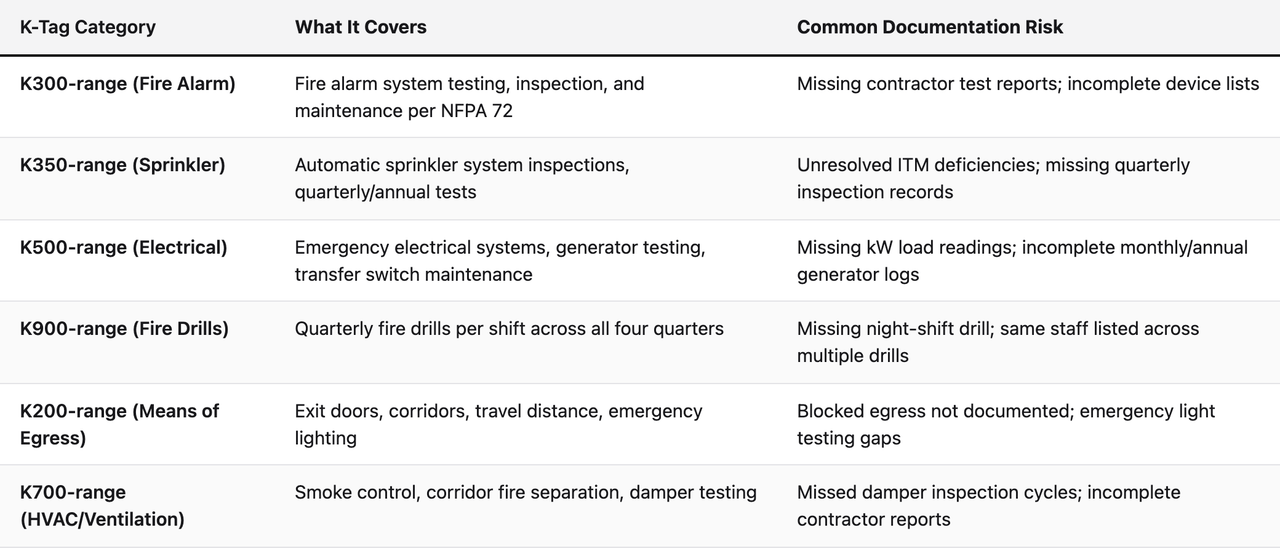
When you open a life safety compliance dashboard and see a red status on "Emergency Electrical Systems," you are looking at potential K500-range exposure. When you see incomplete fire drill records, you are looking at potential K900-range exposure. The dashboard is not showing you abstract maintenance metrics, it is showing you your K-tag risk profile in real time.
Administrators who internalize this mapping stop asking "what does this number mean technically?" and start asking "what does this status mean for my next survey?" That is the right question, and the dashboard is designed to answer it.
How to Read Completion Rate Panels Without Getting Fooled by High Numbers
Completion rate is the most prominently displayed metric on most life safety dashboards, and it is also the most commonly misread. A high completion rate does not mean you are survey-ready. Understanding why is critical for any administrator who wants to use this data defensively.
Completion rate measures the percentage of scheduled tasks that have been marked complete within a given period. A 94% completion rate sounds excellent. But completion rate, on its own, tells you nothing about three things that matter enormously to surveyors:
- Whether the completed records are documentarily complete, meaning all required fields are present and internally consistent
- Whether overdue tasks that were eventually completed were completed within the acceptable window
- Whether the 6% that wasn't completed includes any high-severity items
A facility with a 94% completion rate that missed its quarterly sprinkler inspection and its night-shift fire drill in the same quarter has a very different risk profile than a facility that missed six monthly eyewash station checks. Both register as roughly the same completion rate. The dashboard's job is to surface that distinction, and the administrator's job is to look past the headline number.
When reviewing completion rate panels, follow this three-step protocol:
Step 1: Filter by K-Tag Category, Not by Date
Most dashboards allow you to filter tasks by category. Always review completion rate by K-tag category before you look at it as a facility-wide aggregate. A 94% facility-wide completion rate that includes a 72% completion rate in the Fire Alarm category is a problem. The category-level view reveals what the headline number conceals.
Step 2: Identify the Weight of What's Incomplete
Not all tasks are equal under NFPA standards. Monthly fire extinguisher checks carry different regulatory weight than annual fire alarm panel inspections conducted by a licensed contractor. Your dashboard should indicate task frequency and regulatory source for each item. If it does not, ask your maintenance director to categorize open items by regulatory source (NFPA 101, NFPA 99, CMS Appendix Q) before your next review meeting.
Step 3: Look at the Overdue Column Separately
Items that are overdue but not yet completed are your most urgent risk. A task that was due 45 days ago and has not been completed represents a documented gap that a surveyor arriving today would find immediately. Sort by overdue duration and address items that have been open more than 30 days as a priority, regardless of category.
The takeaway for administrators: completion rate is a useful baseline signal, but it is a starting point for review, not a finishing point. Build the habit of clicking through to category-level and item-level detail before forming any conclusion about your facility's compliance posture.
What Documentation Quality Flags Actually Mean (and Why They're More Dangerous Than Missed Tasks)
Documentation quality flags are the most underestimated risk signal in any life safety compliance dashboard. Most administrators focus on whether tasks are being completed. Fewer focus on whether the records of those completions will survive surveyor scrutiny. The latter is where the majority of avoidable citations originate.
A documentation quality flag appears when a completed task record is missing required information, contains internally inconsistent data, or does not meet the minimum record-keeping standard for that inspection type. Common examples include:
- A generator monthly test log that records run time but does not include the kilowatt load reading (required under NFPA 110)
- A fire drill record that lists participants but does not identify the shift being covered or the time the drill began
- A sprinkler quarterly inspection record submitted by a contractor that lists deficiencies but contains no follow-up documentation showing those deficiencies were corrected
- An emergency lighting test log that shows "pass" without recording the duration of the battery discharge test
From a surveyor's perspective, an incomplete record is functionally equivalent to no record at all. CMS Appendix Q outlines the documentation standards that surveyors use to evaluate life safety compliance, and the standard is clear: the record must demonstrate that the required activity was performed in the required manner. A partial record fails that standard just as surely as a missing record.
The reason documentation quality flags are more dangerous than missed tasks is that they are less visible in the daily workflow. A missed task shows up as red on the dashboard, it is hard to ignore. A completed task with a quality flag might show as yellow or with a small indicator icon, and it can easily be dismissed as "basically done." But during a survey, that record will be pulled, reviewed, and found deficient. The facility will receive a citation for an inspection they believed they had completed.
When you see documentation quality flags on your dashboard, the correct administrative response is not to resolve the flag yourself. It is to initiate a review conversation with your maintenance director that asks two questions: what information is missing from this record, and can it still be added contemporaneously or does it constitute a gap we need to note in our corrective action plan? The answer to that question determines whether you have a documentation correction task or a compliance gap that needs to be disclosed and managed proactively.
Reading Deficiency Tracking Panels: The Resolution Lifecycle Every Administrator Should Know
When a life safety inspection identifies a physical deficiency, a door that fails to close properly, a sprinkler head that is obstructed, a generator that fails to transfer within the required 10-second window, that deficiency must be tracked from identification through resolution. The deficiency tracking panel on your compliance dashboard is the administrative record of that lifecycle, and it is one of the panels surveyors most frequently request access to during a survey.
A deficiency tracking panel typically shows each open deficiency with the following information:
- The date the deficiency was identified and the inspection source (in-house inspection vs. contractor report)
- The K-tag category the deficiency falls under
- The current status (open, in-progress, pending contractor, resolved)
- The target resolution date and any extensions
- The name of the person responsible for resolution
As an administrator, you are looking for three specific signals in this panel:
Signal 1: Age of Open Deficiencies
Any deficiency that has been open for more than 60 days without a documented resolution plan is a red flag. For high-severity items, anything affecting means of egress, fire alarm system function, or sprinkler coverage, 30 days without resolution or an interim mitigation plan represents significant survey risk. Most SNF compliance software platforms allow you to set aging thresholds and alert notifications for exactly this reason.
Signal 2: Interim Life Safety Measures (ILSMs)
When a deficiency cannot be immediately corrected, a contractor part is on backorder, a structural repair requires permitting, NFPA 101 requires that the facility implement Interim Life Safety Measures. An ILSM might include increased fire watch rounds, temporary barrier installation, or additional staff notification procedures. Your dashboard should show whether an ILSM has been documented for each long-running deficiency. If a deficiency is 45 days old with no ILSM documented, that is a compliance gap independent of the underlying deficiency itself.
Signal 3: Contractor Deficiency Reconciliation
This is the most commonly missed administrative oversight in SNF life safety management. When a licensed contractor performs an annual fire alarm inspection or sprinkler ITM (inspection, testing, and maintenance) visit, their report will often list deficiencies they observed. Those deficiencies must be entered into your deficiency tracking system and followed to resolution. Many facilities receive contractor reports, file them, and never formally track the deficiencies they contain. When a surveyor requests the contractor report and then asks for the deficiency resolution records, the answer "we filed the report" is not sufficient.
Platforms like SEQURA are specifically designed to close this gap by reviewing contractor-submitted reports against open deficiency records and flagging items that appear in the report but have not been entered into the tracking system. For administrators, the question to ask in your monthly review is simple: "Do we have any contractor-reported deficiencies that are not in the tracking panel?" If the answer is yes, that is your highest-priority action item.
How to Interpret Fire Drill Compliance Panels Without Misreading the Data
Fire drill compliance panels look straightforward but contain several interpretive traps that cause administrators to believe they are compliant when they are not. The CMS requirement under CMS State Operations Manual Appendix PP and the underlying NFPA 101 standard requires quarterly fire drills on each shift, meaning all three shifts must conduct a drill each quarter, for a minimum of 12 drills per year at most SNFs.
The compliance panel error that trips up administrators most often is reading total drill count without verifying shift distribution. A facility that conducted 12 drills in a year, all on day shift, has zero compliant drills under the standard. The panel must show drill completion broken down by shift and by quarter. If your dashboard does not display this breakdown by default, request it before every quarterly review.
Additional fire drill data points that administrators should verify in the compliance panel:
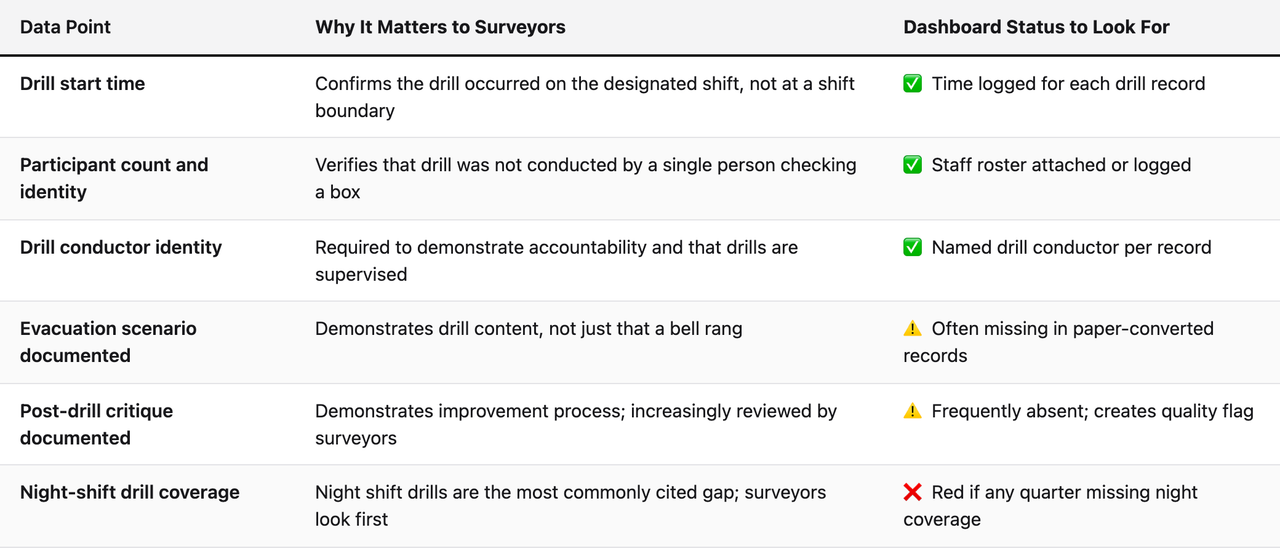
One practical recommendation for administrators: schedule a standing 15-minute fire drill review on the first business day of each new quarter. Pull the dashboard, confirm that the prior quarter shows three drills across three shifts with all required data fields complete, and document that review in your administrative log. That review meeting, itself documented, demonstrates administrative oversight of the fire safety program, which is exactly what surveyors are assessing when they evaluate the K900-range tags.
Generator and Emergency Power Compliance: Reading the Numbers That Surveyors Love to Scrutinize
Emergency power system documentation is consistently one of the highest-scrutiny areas during SNF life safety surveys. The NFPA 110 requirements for generator testing are specific, the required data fields are extensive, and the gap between "we ran the generator" and "we have a compliant generator test record" is wider than most administrators realize.
Your compliance dashboard's emergency power panel should show the following test categories with completion status and documentation quality indicators:
- Weekly no-load exercise: Generator exercised under no load for a minimum period, typically 30 minutes, with transfer switch function confirmed
- Monthly load test: Generator operated under load, with kilowatt output recorded and compared to nameplate rating
- Annual load bank test: Generator tested at a minimum of 30% of nameplate kW rating for at least 4 continuous hours (or documented monthly load tests that satisfy the annual requirement)
- Transfer switch testing: Automatic transfer switch tested monthly with transfer time documented
- Fuel level and maintenance logs: Fuel level checks, oil checks, and preventive maintenance records
The single most common documentation gap in generator compliance is the missing kilowatt load reading on monthly tests. Maintenance staff often record that the generator ran and ran well, they note the start time, the runtime, and that the transfer occurred. What they frequently omit is the actual kW output reading, which is the data point that demonstrates the generator was tested under load as required. When a surveyor reviews 12 monthly generator logs and finds that 9 of them are missing the kW reading, that is a K500-range citation even if the generator itself is in perfect mechanical condition.
As an administrator reviewing the emergency power panel, your job is not to evaluate the mechanical performance of the generator. It is to confirm that the records are complete. Look for documentation quality flags on any generator test record. If the dashboard shows "completed" without a quality indicator confirming all required fields are present, ask your maintenance director to pull the last three monthly records and verify the kW reading is logged for each one.
How to Use the Dashboard to Prepare for an Unannounced Survey
The most powerful administrative use of a life safety compliance dashboard is not passive monitoring. It is active, structured survey simulation, running a deliberate review of your dashboard as if you were a CMS surveyor arriving at your facility today. This practice, done monthly or bi-monthly, is the single most effective way to eliminate documentation gaps before they become citations.
Here is a structured protocol for conducting a dashboard-based survey simulation:
Step 1: Set the Date Range to Rolling 12 Months
CMS surveyors typically review 12 months of life safety documentation. Set your dashboard filter to the rolling 12-month period before you begin any review. This gives you the same temporal window a surveyor would use and surfaces gaps that might not appear in a shorter review window, particularly for annual inspections that are only due once per year.
Step 2: Work Through Each K-Tag Category Systematically
Do not review the dashboard by looking at the aggregate view first. Start at the category level and work through each K-tag grouping in the order that surveyors typically prioritize: means of egress, fire alarm, sprinkler, emergency power, fire drills, then HVAC and building systems. For each category, note any red or yellow status items and document them with their category, item description, and current status.
Step 3: Pull Three Random Completed Records per Category for Quality Review
For each K-tag category, open three randomly selected completed task records and review them for completeness. Are all required fields present? Is the record signed or attributed to a specific person? Does the record contain any internal inconsistencies (e.g., a test logged as completed at 3:00 AM on a day when the facility has no night-shift maintenance staff)? This spot-check approach surfaces documentation quality issues that aggregate completion rate numbers cannot.
Step 4: Review the Deficiency Tracking Panel for Age and ILSM Status
Pull every open deficiency and sort by age. Any item over 60 days old needs a documented resolution plan or a documented ILSM. Any item over 90 days old needs to be escalated to your regional or corporate compliance team if one exists, or to an external life safety consultant if you are a single-facility operator.
Step 5: Document Your Review
This is the step most administrators skip, and it is the one that provides the greatest survey protection. Document that you conducted a compliance review, the date, what you reviewed, what you found, and what actions you initiated. This administrative oversight log demonstrates to surveyors that the life safety program has active administrative governance, which is itself a compliance requirement under the CMS Requirements of Participation for long-term care facilities.
Building a Shared Language Between Administrators and Maintenance Directors
One of the most consequential improvements an administrator can make to their facility's compliance posture has nothing to do with technical knowledge. It is establishing a shared interpretive language with the maintenance director, a common vocabulary and a structured review cadence that ensures compliance data flows from the dashboard to administrative decision-making efficiently.
Many SNFs operate with a communication pattern where the maintenance director manages life safety compliance independently and surfaces issues only when they become urgent. The administrator trusts the maintenance director's expertise and stays out of the technical details. This arrangement works well for day-to-day operations. It fails catastrophically when a survey arrives and the administrator is asked to speak to the facility's compliance program, because they have been kept at arm's length from the data.
A more effective model uses the compliance dashboard as the shared artifact for a structured monthly review. The meeting does not need to be long, 30 to 45 minutes is sufficient if the dashboard is prepared in advance. The structure should follow this format:
- Completion rate by category: Maintenance director walks through any category below 90% and explains the cause
- Documentation quality flags: Any flagged records are reviewed and assigned a resolution action
- Open deficiencies over 30 days: Status update on each item, resolution timeline confirmed or revised
- Upcoming high-frequency items: What major inspections or contractor visits are due in the next 60 days
- Administrator action items: Any items requiring administrative decision (budget approval for repair, contractor scheduling, ILSM authorization)
This meeting structure gives the administrator the context to interpret dashboard data without needing to understand the underlying technical specifications. The maintenance director provides the technical interpretation. The administrator provides the regulatory and administrative response. Both are doing their job, and the dashboard is the shared source of truth that keeps them aligned.
For administrators at multi-site organizations using a platform like SEQURA, this same structure can be applied at the regional level, with a regional facilities manager reviewing aggregated dashboard data across multiple facilities and escalating site-specific issues to individual administrators and maintenance directors for resolution.
Common Dashboard Misreads That Lead to Surprise Survey Citations
Understanding what to look for is only half the skill. Understanding what administrators commonly misread, and why, is equally valuable. These are the interpretive errors that show up most frequently in facilities that believed their compliance posture was strong and then received life safety citations.
Misread 1: Treating "Scheduled" as "Compliant"
A task that is scheduled but not yet completed is not a compliant inspection. Some dashboards display upcoming scheduled tasks in a way that makes them appear as active compliance activity. An administrator reviewing the dashboard in early Q4 should not interpret "Q4 fire drills scheduled" as evidence of Q4 drill compliance. Scheduled means planned. Completed and documented means compliant.
Misread 2: Counting Contractor Visits Without Verifying Report Receipt
A contractor visit on the calendar is not the same as a contractor report in the compliance record. Facilities frequently schedule annual inspections, the contractor visits, and then the written report arrives weeks later, or does not arrive at all, or arrives with deficiencies that go untracked. The dashboard should show report receipt and review status, not just contractor visit status. If it only shows the visit, the administrator is working with incomplete data.
Misread 3: Interpreting "No Deficiencies Found" as Full Compliance
An inspection that found no deficiencies is good news. But it is not the same as a complete compliance record. Surveyors evaluate the process of inspection, the frequency, the completeness of the record, the qualifications of the inspector, not just the outcome. A facility that passed every inspection but conducted them at the wrong frequency or with incomplete records is still at citation risk.
Misread 4: Assuming Vendor-Managed Systems Are Self-Compliant
Many SNFs contract with vendors who manage their fire alarm, sprinkler, and elevator systems. Administrators sometimes assume that because a vendor is managing the system, the compliance documentation is being managed too. It is not, or at least, it cannot be assumed. The compliance obligation belongs to the facility. Vendor reports must be received, reviewed, entered into the deficiency tracking system, and retained in the facility's compliance record. The dashboard should show vendor report status explicitly.
Frequently Asked Questions
What is a life safety compliance dashboard in an SNF context?
A life safety compliance dashboard in a skilled nursing facility is a digital interface that aggregates the status of all required life safety inspections, tests, drills, and deficiency resolutions into a single real-time view. It replaces the paper binder traditionally kept by the maintenance director and gives administrators, maintenance teams, and compliance officers a shared, continuously updated record of the facility's compliance posture against NFPA 101, NFPA 99, and CMS life safety requirements.
How often should an SNF administrator review the compliance dashboard?
At minimum, administrators should conduct a structured dashboard review monthly, with a more detailed survey-simulation review quarterly. Between formal reviews, administrators should receive automated alerts for any high-priority status changes, overdue items in K-tag categories, new documentation quality flags, or deficiencies aging past 30 days without a resolution plan. Real-time alert configuration is a standard feature in purpose-built SNF compliance software and should be set up during implementation.
What are the most commonly cited K-tags during SNF life safety surveys?
Fire drill compliance (K900-range), automatic sprinkler system deficiencies (K350-range), emergency electrical system documentation gaps (K500-range), and means of egress issues (K200-range) are among the most frequently cited categories during SNF life safety surveys. Documentation quality issues, incomplete records rather than missed inspections, contribute to a significant portion of these citations.
Can an administrator without a maintenance background effectively oversee life safety compliance?
Yes, provided they focus on the administrative dimensions of compliance rather than the technical ones. Administrators are responsible for ensuring the compliance program exists, that it is adequately resourced, that documentation is complete and contemporaneous, and that deficiencies are tracked and resolved. These are administrative functions, not technical ones. A well-designed SNF administrator compliance dashboard surfaces the information needed to fulfill these functions without requiring technical maintenance expertise.
What is the difference between a documentation quality flag and an open deficiency?
A documentation quality flag indicates that a completed task record is missing required information, the inspection was performed, but the record of it is incomplete. An open deficiency indicates that an inspection or test found a physical or operational problem that has not yet been corrected. Both carry survey risk, but through different mechanisms. Quality flags create risk because the incomplete record will fail surveyor review. Open deficiencies create risk because the underlying condition may constitute a direct Life Safety Code violation.
How do I explain life safety compliance dashboard data to my Board of Directors?
Frame dashboard data in terms of survey risk exposure rather than technical metrics. Report the number of open high-priority deficiencies, the age of the oldest unresolved deficiency, and the completion rate for the top three K-tag categories. If the facility has received life safety citations in previous surveys, report on whether the conditions that produced those citations are now documented as resolved. Board members are accountable for organizational risk, and compliance dashboard data translates directly into that language.
What should I do if the compliance dashboard shows a red status item I don't understand?
Do not dismiss it and do not attempt to resolve it without understanding it. Bring the specific item, including the K-tag category, the item description, and the current status, to your maintenance director and ask for a plain-language explanation of what the deficiency is, what the correction requires, and what the timeline for resolution is. Document that conversation. If the maintenance director cannot provide a clear answer, the item should be escalated to a life safety consultant for review.
How does SEQURA help administrators who don't have a maintenance background read compliance data?
SEQURA is designed to present compliance data in a format that is administratively actionable rather than technically dense. Its AI review layer surfaces documentation gaps in plain language, identifying not just that a record is incomplete but what specific field is missing and what regulatory requirement that field satisfies. This means an administrator can read a SEQURA alert and understand the regulatory implication without needing to interpret raw inspection data. The platform also provides pre-built life safety compliance reporting views organized by K-tag category, which maps directly to how CMS surveyors organize their survey findings.
What is an Interim Life Safety Measure (ILSM) and when does my dashboard require one?
An ILSM is a temporary compensatory measure required under NFPA 101 when a life safety deficiency cannot be immediately corrected. Common ILSMs include increased fire watch patrols, temporary barrier installation, and additional staff notification procedures. Your compliance dashboard should prompt for ILSM documentation when a deficiency ages past a defined threshold, typically 30 days for high-severity items. If your platform does not automatically flag this requirement, build it into your deficiency review protocol manually.
How do I know if my compliance dashboard is showing me accurate data or just what staff entered?
This is the right question to ask, and it points to the difference between a data-entry tool and an audit tool. A basic digital task management system shows you what staff entered. A platform with an AI audit layer, like SEQURA, cross-references what was entered against what was required and flags discrepancies. Accuracy checks include: verifying that timestamps are consistent with known staffing patterns, confirming that required fields are present in completed records, and reconciling contractor-submitted reports against internally logged records. Spot-check three to five records per category monthly to maintain confidence in data integrity.
What is the relationship between CMS survey readiness and daily dashboard use?
CMS survey readiness is not a state you achieve before a survey, it is the ongoing condition of having complete, contemporaneous, and compliant documentation at all times. The dashboard is the operational tool that maintains that condition. Facilities that treat the dashboard as a survey-prep tool rather than a daily operational tool will always have gaps, because documentation deficiencies accumulate in the weeks and months between review cycles. Daily or weekly maintenance director engagement with the dashboard, combined with monthly administrator review, creates the continuous compliance posture that makes an unannounced survey a manageable event rather than a crisis.
Can a single dashboard be used across multiple SNF locations?
Yes, and multi-site dashboards are one of the most powerful tools available to regional facilities managers and COOs at SNF chains. A well-designed facilities management software healthcare platform like SEQURA provides both facility-level views for site-specific management and aggregated regional views that allow leadership to compare compliance posture across facilities, identify systemic documentation gaps, and prioritize resource allocation. Facilities with consistently lower completion rates or more open deficiencies can be identified and supported before a survey finds them first.
Key Takeaways
- A compliance dashboard is a survey readiness report, not a maintenance management tool. Administrators should approach it as a real-time view of their K-tag risk profile, not a technical system to be delegated entirely to maintenance staff.
- Completion rate is a starting point, not a conclusion. Always review completion data at the K-tag category level and verify the quality of completed records before forming any judgment about compliance posture.
- Documentation quality flags are more dangerous than missed tasks because they are less visible and create citations on inspections the facility believes it completed correctly.
- Contractor-reported deficiencies must be actively tracked. Receiving and filing a contractor report is not sufficient. Every deficiency in that report must be entered into the tracking system and followed to resolution.
- Fire drill compliance requires shift-level analysis. A total drill count that looks adequate can conceal a complete failure of night-shift drill coverage, which is one of the most common K900-range citations.
- Generator test records must include kilowatt load readings. The most common emergency power documentation gap is a technically correct test with an incomplete record that fails surveyor review.
- Monthly administrator review, documented, demonstrates the administrative oversight that CMS Requirements of Participation require. The review itself is a compliance activity.
- The shared language between administrators and maintenance directors is more important than technical knowledge. A structured monthly dashboard review meeting creates alignment and ensures compliance data reaches administrative decision-making in time to act on it.
- Survey readiness is a continuous operational condition, not a pre-survey sprint. Facilities that maintain daily engagement with their compliance dashboard are the facilities that treat an unannounced survey as a confirmation of what they already know, not a discovery of what they missed.
About the author
Benjamin Terebelo · Founder
Benjamin is the founder of SEQURA, a compliance platform purpose-built for healthcare facilities. He builds at the intersection of healthcare operations and software, maintaining a focus on bringing modern tooling to systems that the broader industry has largely left behind.
About the author
Benjamin Terebelo · Founder
Benjamin is the founder of SEQURA, a compliance platform purpose-built for healthcare facilities. He builds at the intersection of healthcare operations and software, maintaining a focus on bringing modern tooling to systems that the broader industry has largely left behind.