
How to Assign, Track, and Log Life Safety Tasks Across a Multi-Site SNF Portfolio

Picture a regional director of facilities sitting down on a Monday morning with a spreadsheet she built herself. Across the top row: twelve skilled nursing facilities. Down the left column: every recurring life safety task she can remember. Fire drills. Generator load tests. Sprinkler inspections. Eyewash station flushes. Emergency lighting checks. The cells are a patchwork of initials, dates, and the occasional "N/A, call Tim." She knows the spreadsheet is incomplete. She knows three of her maintenance directors are behind on documentation. What she does not know is which specific tasks are missing, whether any of those gaps correspond to K-tags that CMS surveyed two facilities for last quarter, or whether the paper logs her teams are producing would actually hold up under scrutiny.
This is not a failure of effort. It is a failure of infrastructure. Managing life safety tasks across a multi-site SNF portfolio without a structured assignment, tracking, and logging system is like trying to navigate twelve separate construction sites with one clipboard and no radio. The work gets done, mostly. The documentation is another story.
This guide walks through every layer of the problem: how to assign life safety tasks so the right person gets the right job at the right cadence, how to track completion in real time across facilities without chasing down maintenance directors, and how to log everything in a format that survives CMS scrutiny. Each step includes the specific decisions, tools, and configurations that make the difference between a documentation system and a survey liability.
Step 1: Build a Regulatory-Grounded Task Library Before You Assign Anything
Before a single work order is created, your portfolio needs a vetted master task library tied directly to NFPA 101, NFPA 99, and CMS Conditions of Participation. Assigning tasks without this foundation produces the most dangerous documentation failure mode in multi-site SNF facilities management: work that gets done but does not map to what surveyors actually look for.
Most spreadsheet-based systems and even many generic work order tools fail here. They track tasks as labels, "fire extinguisher check," "generator test", without encoding the regulatory expectation behind each task. When a surveyor pulls documentation and asks whether the generator test captured the required kilowatt load reading, or whether the fire drill record documents staff response actions (not just that a drill occurred), a label is not enough. The task definition itself needs to carry the compliance requirement.
What a Regulatory-Grounded Task Looks Like
A properly structured life safety task record includes, at minimum:
- The regulatory citation it satisfies (e.g., NFPA 110, Chapter 8; CMS K-tag K574 for generator testing)
- The required frequency (weekly, monthly, quarterly, annually, or event-triggered)
- The specific data fields that must be captured at completion, not just "completed yes/no" but measured values, observations, and corrective actions
- The asset or location it applies to (tied to a facility asset register, not a free-text description)
- The qualified role allowed to complete it (maintenance technician, licensed contractor, or director-level sign-off)
For a generator test, this means the task record must prompt for: date and time of test, duration, load percentage achieved, any abnormal readings, fuel level before and after, and the name and role of the person conducting the test. A checkbox that says "generator tested" satisfies no surveyor and protects no administrator.
Building the Library for Multiple Facilities
In a multi-site portfolio, the task library needs to account for facility-level variation while maintaining a consistent regulatory spine. A 60-bed SNF and a 180-bed SNF share the same NFPA 101 obligations, but the 180-bed facility may have a wet pipe sprinkler system, a second generator, and a kitchen suppression system that require additional tasks. The library must be structured so that shared regulatory tasks are inherited from a portfolio-level template, while facility-specific assets trigger additional task assignments automatically.
This is where facilities maintenance management platforms built for healthcare differ from general-purpose work order tools. A platform like SEQURA maintains a pre-built NFPA and CMS task template library developed with life safety consultants, meaning the regulatory mapping is already done. The operator's job is to configure the library to each facility's asset register, not to build the regulatory logic from scratch.
Common mistake to avoid: Copying task lists from a paper binder without verifying the frequency against current NFPA editions. NFPA 101 and NFPA 99 are updated on a regular cycle, and many SNF portfolios are operating on task schedules derived from an edition that is no longer current. State surveyors increasingly cite the current edition adopted by the state, not the edition in effect when the binder was last updated.
Estimated time for this step: 3–5 days for a portfolio of 10–12 facilities, assuming a pre-built template library is available. Building from scratch against raw NFPA documents takes 4–6 weeks and requires life safety consultant involvement.
Step 2: Configure Asset-Based Work Order Assignment, Not Name-Based Assignment
The most resilient multi-site SNF task assignment systems tie work orders to assets and roles, not to individual people by name. Name-based assignment is the number-one reason life safety task coverage breaks down when a maintenance director leaves, a technician calls in sick, or a facility goes through leadership transition.
In practice, this means every recurring life safety task is assigned to a role at a location (Maintenance Director, Facility 7) rather than to "Mike." When Mike leaves, the task does not disappear into an unassigned queue. It stays active, assigned to whoever now holds that role at that facility. The regional director does not need to manually reassign 200 recurring tasks every time there is staff turnover.
Setting Up the Assignment Hierarchy
For a multi-site SNF portfolio, the assignment hierarchy typically has three tiers:
- Portfolio-level ownership: The regional director of facilities or VP of operations holds accountability for all life safety tasks across every facility. This person sees the full dashboard, receives escalation alerts, and approves any task deferrals that could affect survey readiness.
- Facility-level ownership: Each SNF's maintenance director or plant operations manager owns the task schedule for their building. They receive daily or weekly work order queues, can reassign tasks to technicians, and are responsible for ensuring completion documentation meets the required standard.
- Task-level execution: Individual maintenance technicians or EVS staff complete tasks and log completion at the point of work, via mobile device, facility kiosk, or back-office terminal. They do not need to understand the regulatory context of every task; the platform surfaces the required data fields at the time of completion.
This three-tier model also determines escalation logic. If a task is not completed within its required window, the system escalates upward: first to the facility maintenance director, then to the regional director. The escalation is time-based and automatic, not dependent on anyone remembering to follow up.
Configuring Recurring vs. Event-Triggered Tasks
Life safety tasks fall into two categories that require different assignment logic:
Recurring tasks follow a fixed schedule (weekly fire extinguisher checks, monthly emergency lighting tests, quarterly sprinkler inspections). These are auto-generated by the scheduling engine at the configured frequency and assigned to the appropriate role. No manual work order creation is needed.
Event-triggered tasks are generated by a specific occurrence: a fire drill produces follow-up corrective action tasks, a generator failure triggers an incident documentation workflow, a contractor inspection report with open deficiencies creates remediation work orders. These need to be linked to their originating event so the documentation trail is intact for surveyors.
In mobile work order management systems designed for field use, technicians completing an inspection can flag a deficiency in the same workflow that logs the inspection. The deficiency automatically creates a follow-up work order, assigns it to the appropriate role, and starts its own completion clock. This is the difference between a documentation system and a compliance system: the latter knows that an open deficiency is a liability until it is resolved and documented.
Pro tip: For NFPA 99 medical gas inspections and other tasks requiring licensed contractor completion, configure the assignment system to flag contractor-required tasks separately from in-house tasks. Contractor tasks should trigger procurement workflows (scheduling the vendor, issuing a purchase order) as well as documentation workflows (receiving and filing the contractor's report). Many multi-site portfolios lose survey points not because the contractor failed to do the work, but because the contractor's report was never formally received, reviewed, and filed against the asset record.
Step 3: Implement Real-Time Tracking Across All Facilities From a Single Dashboard
Real-time visibility into task completion status across every facility in a portfolio is the operational core of multi-site SNF facilities management. Without it, a regional director learns about compliance gaps only when a surveyor finds them. With it, the same director can identify and close gaps on a rolling basis, weeks or months before an unannounced visit.
The critical design requirement for a portfolio-level dashboard is that it must answer three questions simultaneously: What is overdue right now? What is due in the next 7–14 days? And which facilities have open deficiencies that are not yet resolved? Any dashboard that requires drilling into individual facility records to answer these questions is not functioning as a portfolio management tool.
What the Dashboard Must Surface
A functional facilities maintenance management platform for multi-site SNFs surfaces the following at the portfolio level:
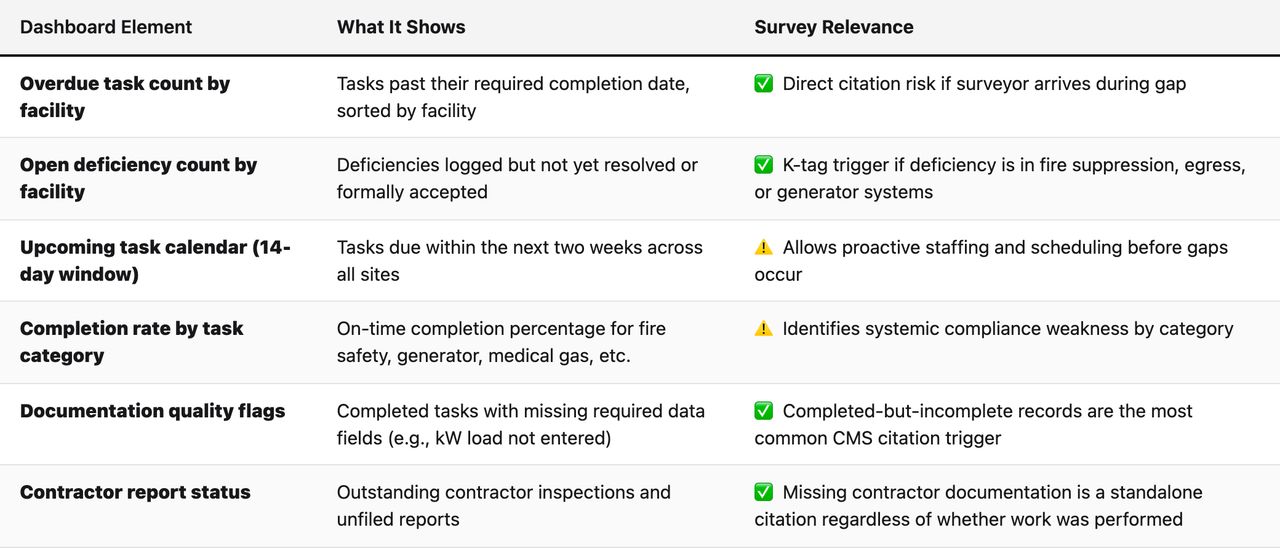
Configuring Alert Thresholds for Multi-Site Operations
In a portfolio context, not all overdue tasks carry equal survey risk. A missed monthly fire extinguisher visual check at Facility 3 is not the same compliance exposure as a generator load test that is 45 days overdue at Facility 8. Maintenance scheduling software for healthcare environments needs to support risk-weighted alert thresholds that escalate critical life safety tasks faster than routine maintenance items.
Configure alert thresholds in two dimensions:
- By task criticality: NFPA 101 and NFPA 99 tasks with direct K-tag exposure (generators, fire suppression, emergency egress, medical gas) should trigger alerts at 24–48 hours past due. Routine maintenance tasks can carry a longer escalation window.
- By time-to-next-survey estimate: If a facility has had a recent survey or is approaching the typical survey cycle for its state, temporarily tighten alert thresholds across all task categories for that facility. Regional directors managing 10+ facilities often use a rolling "survey readiness tier" system: facilities in the high-alert tier get tighter monitoring, facilities that were recently surveyed get standard monitoring.
Warning: Do not configure alerts to go exclusively to the facility maintenance director. In multi-site portfolios, alert fatigue at the facility level is real. A maintenance director managing 200+ recurring tasks across a large building will filter or ignore alerts that seem routine. Portfolio-level oversight requires that regional directors receive escalation alerts for any task that is more than 72 hours overdue for critical systems, regardless of whether the facility director has acknowledged the alert.
Step 4: Standardize Contemporaneous Logging at the Point of Work
Contemporaneous logging, documenting task completion at the time and place the work occurs, not hours or days later, is the single most important compliance distinction CMS surveyors make when evaluating life safety documentation. A log entry created the same day as the task, with a timestamp, the completing individual's name and role, and the required data fields, carries far more weight than a log that was filled in retroactively or reconstructed from memory.
For multi-site SNF portfolios, achieving contemporaneous logging at scale requires removing the friction between doing the work and documenting it. When a maintenance technician has to walk back to the office, log into a desktop system, find the right task, and enter completion data after the fact, documentation happens inconsistently. When the same technician can pull up the task on a mobile device or facility kiosk while still standing next to the fire panel, contemporaneous documentation becomes the path of least resistance.
Three Completion Channels for SNF Environments
Not every SNF team has the same technology access profile. A well-designed mobile work order management system for SNFs supports at least three completion channels:
- Mobile app (smartphone or tablet): Best for maintenance directors, plant operations managers, and technicians who carry a device during their shift. Mobile completion allows GPS timestamping, photo documentation of completed work or identified deficiencies, and offline sync for areas of the building with poor connectivity.
- Facility kiosk (shared terminal): Best for EVS staff, floor technicians, and other team members who do not carry personal devices. A shared kiosk at a fixed location (maintenance office, EVS closet) allows any staff member to log completion with a PIN or badge, without requiring individual device provisioning.
- Back-office desktop: Best for maintenance directors completing documentation review, submitting contractor reports, or logging tasks that require written narrative (e.g., fire drill after-action notes). Desktop entry is appropriate for documentation-heavy tasks but should never be the primary channel for field completion.
For portfolios that include facilities with limited technology adoption, the kiosk model is often the most reliable path to consistent contemporaneous logging. The kiosk does not require every staff member to own or manage a device, and it creates a physical anchor for the documentation habit: you complete the task, you log it at the kiosk before you move on.
What Contemporaneous Logging Must Capture
The minimum data that makes a completion log defensible under CMS and state survey scrutiny:
- Date and time of completion (system-generated timestamp, not manually entered)
- Name and role of completing individual (not just a signature line)
- Asset identifier (specific generator, specific fire panel, specific sprinkler zone)
- All required measured values or observations for the specific task type
- Pass/fail or satisfactory/deficiency designation for each inspection point
- Corrective action notation if a deficiency is identified (what was found, what was done, whether a follow-up work order was created)
- Method of completion verification if applicable (contractor present, supervisor witnessed, photo attached)
Portfolios using SEQURA benefit from the platform's AI review layer, which reads completed records and surfaces documentation quality gaps automatically. If a generator test was logged without a kW load reading, the system flags it before the next survey cycle. If a fire drill record is missing the required documentation of staff response actions, the flag surfaces at the portfolio dashboard level, not buried in a single facility's binder.
Common mistake to avoid: Treating "completed" as a binary state. Many work order management software implementations mark a task complete when the technician closes the work order, regardless of whether all required data fields were populated. This creates a false compliance picture: the dashboard shows full completion, but the underlying records have gaps that a surveyor will find. Configure your platform so that a work order cannot be closed as complete until all required fields are populated. This is a configuration setting, not a technical limitation, in most modern platforms.
Step 5: Build a Deficiency Management Workflow That Closes the Loop
Open deficiencies are the most common source of life safety citations at SNFs, and the most preventable. The issue is rarely that maintenance staff fail to identify deficiencies during inspections. The issue is that deficiencies identified during inspections do not always generate formal work orders, those work orders do not always get completed within a defensible timeframe, and the documentation connecting the deficiency to its resolution is often incomplete or missing.
In a multi-site portfolio, this problem is amplified. A deficiency logged at Facility 4 during a monthly sprinkler inspection may generate a work order assigned to a contractor. That contractor may complete the repair three weeks later. But if the contractor's completion report is never formally received, reviewed, and linked back to the original deficiency record, the documentation trail is broken. A surveyor reviewing the sprinkler inspection log will see the deficiency noted. Without a clear chain of custody to a resolved work order and a contractor completion report, the deficiency looks open, regardless of whether the repair was made.
The Four-Part Deficiency Loop
A complete deficiency management workflow has four required components:
- Deficiency identification and logging: The deficiency is identified during an inspection and logged contemporaneously (per Step 4). The logging interface prompts the technician to classify the deficiency by system type (fire suppression, egress, electrical, medical gas, etc.) and severity (immediate threat to life safety vs. maintenance-level repair).
- Work order creation and assignment: The deficiency automatically generates a corrective action work order. The work order is assigned to the appropriate role (in-house technician or contractor), given a due date based on the severity classification, and linked to the originating inspection record. The work order cannot be independently deleted or closed without a completion record.
- Completion documentation: When the repair or corrective action is completed, the technician or contractor logs completion with the same data standards as the original inspection (timestamp, name, role, work performed, materials used, final status). If a contractor completes the work, their report must be uploaded to the work order record, not filed separately.
- Closure verification: The facility maintenance director reviews and formally closes the deficiency, confirming that the corrective action meets the required standard. In critical system categories (fire suppression, generators, emergency egress), closure should require director-level sign-off, not just technician self-certification.
This four-part loop creates the documentation chain that surveyors look for: deficiency identified, work order created, repair completed and documented, deficiency formally closed. Each step is timestamped, role-attributed, and linked to the asset record. There is no ambiguity about whether the issue was resolved.
Escalation for Unresolved Deficiencies
Deficiencies in life safety systems have regulatory timeframes for resolution that vary by system type and deficiency severity. Under CMS Life Safety Code survey guidance, certain fire protection system deficiencies require interim protective measures and formal plans of correction with defined timelines. Configure your platform to:
- Automatically escalate any unresolved deficiency in a fire suppression, generator, or emergency egress system that exceeds 30 days without a closed work order
- Flag deficiencies requiring interim life safety measures (ILSM) assessments separately from routine corrective action items
- Alert the regional director and compliance officer when a deficiency triggers an ILSM threshold, requiring a formal written assessment and compensatory measures
Step 6: Standardize Fire Drill Documentation Across Every Shift and Every Facility
Fire drill documentation is one of the highest-frequency CMS citation triggers in SNF surveys, and it fails in consistent, predictable patterns that are almost entirely preventable with proper workflow configuration.
NFPA 101 requires SNFs to conduct fire drills on all three shifts and in all four quarters of the year, with specific documentation requirements for each drill. The most common citation pattern is not that drills were not conducted. It is that the documentation is incomplete, does not cover all required shifts, or does not demonstrate that staff response actions were evaluated.
Configuring the Fire Drill Task Template
A fire drill task in a multi-site SNF system should be configured with the following parameters:
- Frequency: Quarterly per shift (day, evening, night). The scheduling engine should track which shifts have been covered in each quarter and alert when a shift is approaching the end of a quarter without a completed drill.
- Required documentation fields: Date, time, shift, building area covered, alarm activation method, staff count present, evacuation route used, staff response assessment (what went well, what needs improvement), and the name and role of the drill supervisor.
- Shift coverage verification: The system should not allow a quarter to close as "compliant" for fire drills unless documentation exists for all three shifts. This prevents the common pattern where day-shift drills are consistently documented and night-shift drills are consistently missing.
- Corrective action tracking: Any staff response deficiency noted in a fire drill should automatically generate a follow-up training or corrective action task assigned to the director of nursing or staff development coordinator, not just the maintenance director.
In a multi-site portfolio, fire drill compliance is often the fastest indicator of overall documentation culture at a facility. Facilities with consistent, well-documented fire drills across all shifts tend to have better documentation practices generally. Facilities with night-shift drill gaps are often the same facilities with other documentation weaknesses. Use fire drill coverage as a leading indicator when prioritizing survey readiness attention across your portfolio.
Step 7: Use Documentation Analytics to Find Gaps Before Surveyors Do
The operational steps above produce a documentation system. The analytic layer on top of that system is what transforms it from a record-keeping function into a survey readiness function. In modern facilities maintenance management platforms built for healthcare, the analytic layer reads completed documentation and surfaces patterns that indicate compliance risk, not just missing checkboxes.
This is the distinction between a work order system and a compliance intelligence platform. A work order system tells you whether tasks were completed. A compliance intelligence platform tells you whether the completed tasks produce a documentation record that would survive CMS scrutiny.
The Documentation Gaps That Produce Most Citations
Based on recurring CMS and state survey findings at SNFs, the documentation patterns that most consistently produce life safety citations fall into four categories:
- Completed-but-incomplete records: The task was logged as completed, but required data fields (measured values, observations, corrective actions) were not populated. The completion exists in the system, but the record does not satisfy the regulatory requirement. This is the most common and most preventable citation trigger.
- Frequency gaps: Tasks were completed, but not at the required frequency. Monthly tasks completed every 5–6 weeks accumulate gaps over a 12-month period. The annual summary shows 10 completions instead of 12. A surveyor reviewing the log will note the gap.
- Shift and coverage gaps in event-based documentation: Fire drills missing one or more required shifts, as described above. Generator tests that consistently occur during business hours but never capture a full-load test with the building's actual load profile.
- Unreconciled contractor reports: Contractor inspection reports filed in the system but not formally reviewed, accepted, or linked to deficiency resolution records. The report exists, but there is no evidence that anyone reviewed it and acted on its findings.
How AI-Assisted Review Changes the Analysis
Manual review of documentation across a 10+ facility portfolio is not feasible at the frequency required to maintain survey readiness. A regional director cannot read every completed inspection record for every facility every week. What they can do is review a curated list of flagged records, records that an AI review system has identified as potentially incomplete, inconsistent, or misaligned with regulatory expectations.
SEQURA's AI review layer does exactly this. It reads completed records, contractor reports, and shift logs, cross-references them against the regulatory expectations for each asset and K-tag category, and surfaces specific documentation gaps for human review. The output is not a report that tells you "generator documentation needs improvement." It is a specific flag: "Facility 7, Generator Test 09/14, kW load reading missing. K-tag K574 risk."
This level of specificity is what allows a regional director to manage compliance across twelve facilities without twelve separate administrative staff. The analytic layer does the reading. The director does the decisions.
Step 8: Configure Contractor and Vendor Documentation Intake
In a multi-site SNF portfolio, a significant portion of required life safety inspections are performed by licensed contractors, not in-house staff. Annual fire alarm system inspections, sprinkler system certifications, elevator inspections, medical gas system certifications, and many NFPA 99 requirements fall into this category. Managing contractor documentation intake is a separate workflow problem from managing in-house task completion, and it is one that most generic work order tools handle poorly.
The core challenge is that contractor documentation arrives in formats and at times that are outside the portfolio's control. A contractor may complete an annual fire alarm inspection, generate a report in their own format, and email it to the facility's front desk six weeks after the inspection. If there is no formal intake workflow, that report may never make it into the compliance record in a form that a surveyor can find and review.
Building a Contractor Documentation Intake Workflow
A functional contractor intake workflow for multi-site SNFs includes:
- Pre-inspection work order creation: Every scheduled contractor inspection generates a work order in the platform before the contractor arrives. The work order documents the scheduled date, contractor name, scope of inspection, and the regulatory requirement being satisfied. This creates the placeholder in the compliance record that the contractor's report will fill.
- Report receipt and upload: When the contractor's report is received, it is uploaded to the corresponding work order record. The upload is timestamped and attributed to the person who received and filed it. The report is not considered received until it is in the system.
- Report review and deficiency extraction: The maintenance director or compliance officer reviews the uploaded report and logs any deficiencies identified by the contractor as separate deficiency records, triggering the four-part deficiency loop described in Step 5.
- Formal acceptance or rejection: The director formally closes the contractor work order as satisfactory or flags it for follow-up. This creates the evidence that the report was not just received but reviewed by a qualified person.
For portfolios using a facilities maintenance management platform with AI document review, the contractor report upload can trigger an automated scan for deficiency language, open items, and required follow-up actions. This reduces the risk that a contractor report with open findings gets filed and forgotten without triggering the required corrective action workflow.
Step 9: Prepare Your Documentation for Unannounced Survey Conditions
The final test of any multi-site SNF facilities management system is whether it performs under the specific conditions of a CMS or state unannounced survey. Surveyors typically request life safety documentation immediately upon arrival, and the documentation they request follows predictable patterns tied to the K-tag categories most frequently cited nationally.
The ability to produce organized, complete, and contemporaneous documentation on demand, without a preparation period, is the operational definition of survey readiness. This is qualitatively different from having documentation that is complete after a scramble to organize it. Surveyors are trained to look for signs of retroactive documentation, and they take the contemporaneous nature of records seriously.
The Survey Documentation Request Pattern
CMS life safety surveyors at SNFs typically request documentation in the following sequence, based on the standard survey protocol:
- The past 12 months of fire drill records for all shifts
- Generator testing logs for the past 12 months, including load test documentation
- Fire alarm system inspection and testing records
- Sprinkler system inspection, testing, and maintenance records
- Emergency lighting testing records
- Medical gas system inspection and testing records (if applicable)
- Fire extinguisher inspection and maintenance records
- Any open deficiencies and their corresponding corrective action plans
A platform-based documentation system should be able to produce a complete, organized response to every item on this list in under 10 minutes. If producing this documentation requires searching through paper binders, email attachments, or multiple disconnected systems, the documentation system is not survey-ready, regardless of whether the underlying work was performed.
Configuring Survey-Ready Export
Configure your platform to support on-demand export of documentation packages organized by CMS K-tag category. When a surveyor requests fire drill records, the export should produce a single organized document or digital file with all drill records for the requested period, organized by date, shift, and building area, with all required data fields populated. Not a list of work orders. Not a raw database export. A formatted, readable compliance record.
For multi-site portfolios, configure the export function to work at both the facility level (for the surveyor physically present at one site) and the portfolio level (for regional or corporate compliance review). The same documentation that satisfies a surveyor at Facility 3 should be accessible to the regional director without traveling to Facility 3.
Frequently Asked Questions
What is the difference between work order management software and a facilities maintenance management platform for SNFs?
Generic work order management software tracks task assignment and completion. A facilities maintenance management platform built for healthcare adds regulatory task templates, K-tag mapping, documentation quality validation, and compliance analytics. The functional difference is significant: a generic work order tool tells you a task was completed; a healthcare-specific platform tells you whether the completion record would satisfy a CMS surveyor.
How many facilities can one regional director realistically manage with a modern platform?
With a portfolio-level dashboard, automated escalation alerts, and AI-assisted documentation review, a single regional director can maintain effective oversight of 10–15 SNFs. Without these tools, the practical limit drops to 4–6 facilities before oversight quality degrades. The leverage comes from exception-based management: the platform handles routine monitoring and surfaces only the items that require human decision-making.
Is mobile work order management required for SNF life safety compliance, or is desktop-based logging sufficient?
Mobile work order management is not legally required, but it is the most reliable path to contemporaneous logging in SNF environments. Maintenance staff working in mechanical rooms, on rooftops, or in remote areas of large buildings are unlikely to return to a desktop terminal to log completion immediately after the task. Mobile or kiosk-based logging removes the lag between task completion and documentation, which is precisely what "contemporaneous" means in a survey context.
How does maintenance scheduling software handle NFPA task frequency changes when a new edition is adopted?
This depends heavily on the platform. Generic maintenance scheduling software requires manual reconfiguration when regulatory frequencies change. Platforms built specifically for healthcare compliance (like SEQURA) maintain the task template library and push updates when regulatory changes occur, so the schedule automatically reflects the current NFPA edition without requiring facilities to track edition changes independently.
What happens if a maintenance technician logs completion without populating all required fields?
In a properly configured system, the work order cannot be closed as complete until all required fields are populated. The platform should surface a validation error that prevents submission and identifies the missing fields. If a technician does not have a required value (e.g., they cannot access the generator meter to record kW load), the workflow should require them to flag the task as incomplete with a reason, which generates a follow-up alert rather than allowing a falsely complete record to enter the system.
How should a multi-site SNF portfolio handle facilities that have very different asset profiles?
The task library should be structured with a portfolio-level regulatory spine (tasks that apply to all SNFs regardless of configuration) and facility-level asset layers (tasks that apply only to specific systems present at that facility). When a new facility joins the portfolio, the asset registration process triggers the appropriate facility-specific task additions automatically. This prevents both under-assignment (missing tasks for assets that exist) and over-assignment (tasks for systems that do not exist at that facility, which creates false overdue counts).
What documentation does CMS look for in a generator load test record?
Under NFPA 110, the annual generator load test record should capture: date and time, duration of test (minimum 30 minutes under load for Type 1 systems), kilowatt load achieved (minimum 30% of nameplate rating or building load verification), fuel level before and after, any abnormal conditions observed, and the name and credentials of the person conducting the test. K-tag K574 is the most commonly cited generator citation at SNFs, and missing kW load data is the most common specific finding within that K-tag.
Can contractor inspection reports be integrated into a facilities maintenance management platform automatically?
Some platforms support email-to-record or API-based contractor report intake, where a contractor can submit their report directly to the platform rather than emailing a PDF to the facility. This reduces the intake lag and eliminates the manual filing step. For portfolios where contractors are willing to adopt a vendor portal, this is the most reliable intake method. For contractors who will only provide PDF reports, the platform should at minimum support structured PDF upload with automatic metadata tagging (facility, asset, inspection type, date).
How should fire drill documentation be structured to satisfy all three shift requirements?
Each fire drill record should explicitly identify the shift (day, evening, night) and the quarter in which it occurred. The documentation system should prevent a quarterly fire drill requirement from being marked complete unless records exist for all three shifts in that quarter. Many SNFs satisfy the quarterly drill count (four drills per year) but fail the shift coverage requirement (at least one drill per shift per quarter) because the scheduling system tracks drill count, not shift distribution. Configure your platform to track both dimensions independently.
What is an Interim Life Safety Measure (ILSM) and when does it apply in a multi-site SNF portfolio?
An ILSM is a compensatory measure required when a life safety feature (fire alarm, sprinkler system, fire door) is out of service or impaired for any period. The Joint Commission's ILSM guidance and CMS survey protocols both require that SNFs conduct a formal ILSM assessment when a critical system is impaired, document the compensatory measures in place (e.g., fire watch, additional staff rounds, temporary egress modifications), and maintain that documentation until the system is restored. In a multi-site portfolio, ILSM events should be flagged at the regional level immediately, not managed only at the facility level.
How long should life safety documentation be retained for CMS survey purposes?
CMS survey review at SNFs typically covers the most recent 12 months of life safety documentation, but some state surveyors and accreditation bodies request records going back 24–36 months. The practical standard for multi-site portfolios is to retain all life safety documentation for a minimum of three years in an accessible, organized format. Platform-based systems make extended retention straightforward; paper binder systems typically cannot practically support retrieval of records older than the current binder cycle.
What is the most common mistake multi-site SNF operators make when implementing a new facilities management platform?
The most common implementation failure is migrating to a new platform without establishing the regulatory task library first. Operators import their existing task lists from spreadsheets or paper binders, which often contain tasks that are missing regulatory citations, have incorrect frequencies, or lack the required data field structure. The result is a digital version of the same compliance gaps they had before. The correct sequence is: build the regulatory-grounded task library first (Step 1 of this guide), then configure asset assignment, then migrate completion history, then go live.
Key Takeaways for Multi-Site SNF Facilities Management
- Regulatory grounding comes first. Every life safety task in your system must map to a specific NFPA or CMS citation, carry the correct frequency, and require the specific data fields that satisfy the regulatory expectation. Without this foundation, you are documenting work, not compliance.
- Assign to roles, not names. Asset-based, role-based assignment survives staff turnover and eliminates the manual re-assignment burden that causes coverage gaps in multi-site portfolios.
- Real-time portfolio visibility requires exception-based management. A regional director managing 10+ facilities cannot review every record manually. Configure your dashboard to surface overdue tasks, open deficiencies, documentation quality flags, and contractor report gaps at the portfolio level, so human attention goes to the items that need it.
- Contemporaneous logging is non-negotiable. Mobile and kiosk-based completion channels remove the lag between task completion and documentation, which is the defining characteristic of a contemporaneous record under CMS scrutiny.
- Deficiency management is a closed loop, not a to-do list. Every deficiency must generate a work order, every work order must produce a completion record, and every completion record must be formally reviewed and linked back to the originating deficiency. Open loops are survey citations waiting to happen.
- Fire drill shift coverage is the most preventable citation trigger in SNF surveys. Configure your scheduling system to track shift distribution, not just drill count, and to alert before a quarter closes without coverage on all three shifts.
- Documentation analytics find the gaps before surveyors do. Completed-but-incomplete records, frequency gaps, and unreconciled contractor reports are invisible to manual review at scale. AI-assisted documentation review surfaces these patterns continuously, not only when a survey is approaching.
- Survey-ready means producible on demand in under 10 minutes. If your documentation requires a preparation period to organize, it is not survey-ready. Configure your platform for on-demand, K-tag-organized export that any authorized staff member can produce the moment a surveyor walks in the door.
About the author
Benjamin Terebelo · Founder
Benjamin is the founder of SEQURA, a compliance platform purpose-built for healthcare facilities. He builds at the intersection of healthcare operations and software, maintaining a focus on bringing modern tooling to systems that the broader industry has largely left behind.
About the author
Benjamin Terebelo · Founder
Benjamin is the founder of SEQURA, a compliance platform purpose-built for healthcare facilities. He builds at the intersection of healthcare operations and software, maintaining a focus on bringing modern tooling to systems that the broader industry has largely left behind.