
How to Set Up a Facility-Wide Life Safety Task Schedule That Survives Staff Turnover

Most skilled nursing facilities have a life safety binder. Many have two, the official one that lives in the maintenance director's office and the unofficial one that lives in their head. When that maintenance director leaves, both binders walk out the door. What remains is a folder of paper logs, a whiteboard schedule someone half-updated, and a new hire who has no idea which tasks are overdue, which contractors need to be called, and what the state surveyor flagged during the last visit. This is not a hypothetical. It is the operational reality at hundreds of SNFs across the country, and it is exactly the condition that produces K-tag citations during unannounced CMS surveys.
Building a life safety task schedule that survives staff turnover is not primarily a technology problem. It is a systems design problem. The technology only works if the underlying schedule is structured correctly: tasks assigned to roles rather than individuals, inspection cadences tied directly to NFPA and CMS requirements, completion records stored in a system rather than a binder, and gaps surfaced automatically rather than discovered during a survey. This guide walks through that design process step by step, from auditing what you currently have to building a schedule that can onboard a new maintenance technician in under a day without any compliance risk during the transition.
What You Need Before You Start: Prerequisites and Tools
Before building a schedule, you need a clear inventory of what the schedule is supposed to govern. Skipping this step is the most common mistake SNF administrators make when they attempt to standardize their life safety programs. They start with a task list borrowed from another facility or a consultant template, then discover six months later that the schedule misses three asset categories specific to their building configuration.
Facility-Specific Inputs You Must Gather First
Pull together the following before opening any scheduling tool or spreadsheet:
- Your most recent CMS survey report and any state inspection findings. Every K-tag cited at your facility represents a gap in your current schedule. If K-tags appear for sprinkler system documentation, fire drill coverage, or generator test records, those categories need to be the first ones rebuilt in your new schedule.
- Your current life safety equipment inventory. This means every fire door, every sprinkler head zone, every emergency generator, every fire extinguisher, every eyewash station, every exit sign, every medical gas shutoff, and every smoke compartment. If you do not have a current asset list, your first task is to conduct a physical walkthrough and document it. A schedule without an asset list is just a to-do list with no addresses.
- Your state's life safety requirements. CMS Conditions of Participation adopt NFPA 101 Life Safety Code and NFPA 99 Health Care Facilities Code as the baseline, but many states impose additional or more frequent inspection requirements on top of federal minimums. Your state health department or fire marshal's office is the authoritative source for state-specific overlays.
- Current staffing structure and role definitions. You need to know which roles exist in your maintenance department, what each person's certification level is, and which tasks legally require a licensed contractor versus a trained in-house technician.
- Contractor agreements and service schedules. Annual sprinkler inspections, fire alarm testing, generator load bank testing, and elevator inspections are typically performed by outside contractors. Those contractor visits need to be anchored in your schedule, not treated as external events that happen independently of your compliance calendar.
Tools Required
At minimum, you need a scheduling system that stores task records outside of a single person's control. A shared paper binder fails this test by definition. A spreadsheet stored on one person's computer also fails. Acceptable tools range from a shared cloud-based spreadsheet (a floor, not a ceiling) to purpose-built maintenance scheduling software designed for healthcare environments. The latter is significantly more reliable for regulatory purposes because it timestamps completions, maintains an audit trail, and can be structured to require specific data fields (not just a checkmark) before a task is marked complete.
Estimated time for the prerequisite phase: four to eight hours for a single-facility SNF with an existing maintenance program. Longer if your asset inventory is incomplete or your previous schedule was informal.
Step 1: Map Every Life Safety Task to Its Regulatory Source
The foundation of a turnover-proof schedule is regulatory anchoring. Every task on your schedule should have a documented reason for existing, a specific NFPA chapter, a CMS Conditions of Participation tag number, or a state regulation citation. When a new maintenance director joins your facility, they can look at any task on the schedule and immediately understand why it exists, how frequently it is required, and what the documentation standard is. This context is what experienced maintenance directors carry in their heads and what disappears when they leave.
Building Your Regulatory Reference Map
Create a master reference document (or configure your scheduling software to store this at the task level) that captures for each task:
- Task name, specific and unambiguous. "Inspect fire doors" is not specific. "Monthly fire door self-closing device inspection per NFPA 101 Section 19.7.6" is specific.
- Regulatory source, the exact NFPA section, K-tag number, or state regulation that mandates this task.
- Required frequency, daily, weekly, monthly, quarterly, semi-annual, annual, or event-triggered.
- Required documentation standard, what data must be recorded at completion? A pass/fail notation? A measured value (kW load, flow rate, pressure reading)? A contractor report number? Many citations occur not because the inspection was skipped but because the documentation was incomplete.
- Who is qualified to perform the task, in-house staff, licensed contractor, or either depending on the scope.
The Most Commonly Missed Regulatory Sources
The tasks that appear on every facility's schedule (monthly fire extinguisher checks, quarterly fire drills) are rarely the ones that produce citations. The citations tend to cluster in these less-visible categories:
- Fire door annual inspection under NFPA 80. CMS adopted the requirement for annual inspection of all fire-rated doors, and many facilities still treat fire doors as a one-time installation item rather than an annual inspection asset.
- Generator monthly exercise and annual load bank test under NFPA 110. The monthly exercise is usually scheduled. The annual load bank test at rated load for 30 minutes (or 2 hours if the facility cannot achieve rated load through normal operations) is frequently missed or documented incompletely.
- Medical gas system inspections under NFPA 99. Quarterly checks of medical gas zone valve boxes, alarm panels, and bulk oxygen systems are required but often treated informally.
- Sprinkler system quarterly inspections under NFPA 25. Facilities often have annual contractor inspections but miss the quarterly in-house inspection requirements for gauges, control valves, and alarm devices.
- Fire drill documentation completeness. CMS requires drills on each shift, each quarter, with specific documentation including the shift, the number of staff participating, any deficiencies noted, and corrective actions. Missing any of these data fields is a documentation deficiency even if the drill occurred.
Estimated time for Step 1: three to five hours to build the regulatory reference map from scratch. If you are using a platform with a pre-built, regulation-anchored task library, this step is largely completed for you, your job becomes verifying that the library's task definitions match your state's specific requirements.
Step 2: Establish Your NFPA Inspection Cadence Calendar
Once every task has a regulatory anchor and a required frequency, the next step is to build a NFPA inspection cadence calendar that maps tasks to specific time windows across a rolling 12-month period. The goal is not just to list what needs to happen but to distribute tasks so that no single week or month becomes operationally impossible and no regulatory deadline is missed due to scheduling gaps.
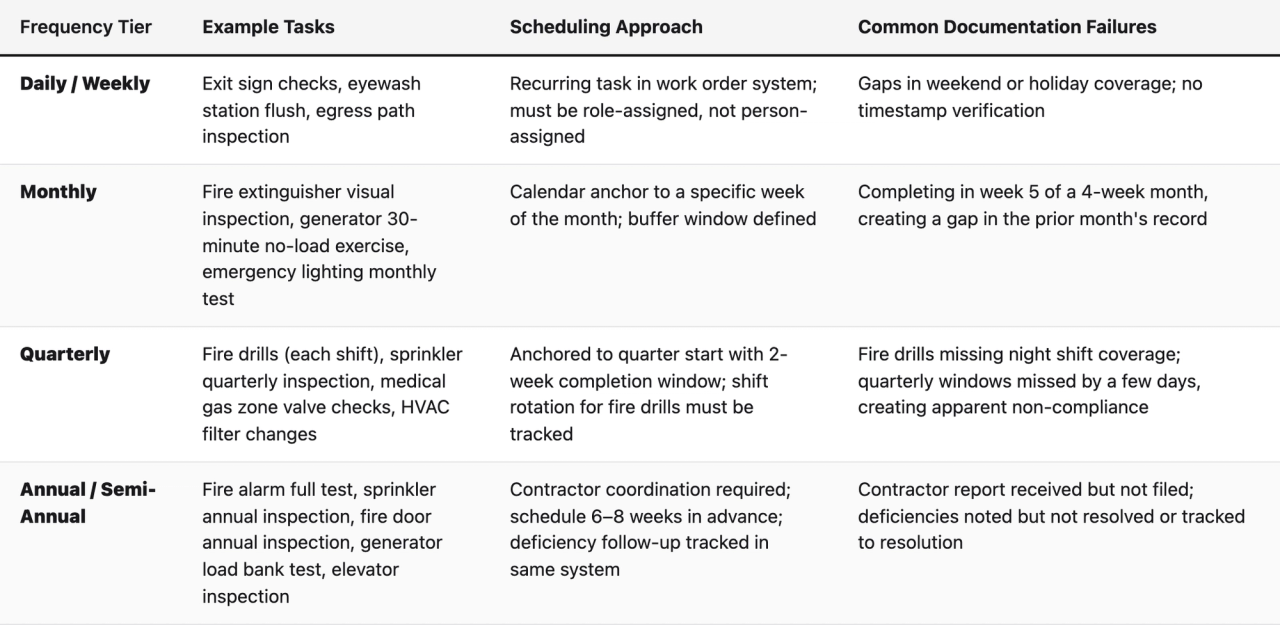
Understanding the Four Frequency Tiers
Life safety tasks in an SNF fall into four recurring frequency tiers, each requiring a different scheduling approach:
Building Buffer Windows Into Every Cadence
One of the most practical and least-discussed aspects of life safety scheduling is the buffer window problem. NFPA and CMS do not always define "monthly" as a precise 30-day interval, but surveyors do look at the pattern of completion dates across a year. If your monthly generator exercise is consistently completed on the 28th or 29th of each month, you will eventually have two completions in the same calendar month and a gap in another, which creates an apparent non-compliance on paper even if the task was never actually skipped.
Define a completion window for every recurring task. A monthly task should have a target completion date and a window of plus or minus five business days. A quarterly task should have a two-week completion window from the start of each quarter. Document the window in your schedule so that any staff member can see when early completion is acceptable and when a task is genuinely overdue.
Anchoring Contractor Visits to Your Internal Calendar
Contractor-performed inspections are not separate from your compliance calendar, they are part of it. Your schedule should include a task for scheduling the contractor appointment (typically 60 to 90 days before the due date), a task for confirming the appointment, a task for receiving and filing the contractor's written report, and a task for reviewing the report for deficiencies and initiating corrective action if any are found. Many SNFs receive a contractor report noting a sprinkler deficiency and file the report without opening a corrective action work order. When the surveyor asks about the deficiency, there is a report showing it was found but no documentation showing it was resolved. That gap is a citation.
Estimated time for Step 2: two to three hours to build the cadence calendar once the regulatory reference map from Step 1 is complete.
Step 3: Assign Tasks to Roles, Not Individuals
This is the single most important structural decision in building a turnover-proof schedule. Every task in your system must be assigned to a role, "Maintenance Technician," "Maintenance Director," "EVS Staff," "Licensed Electrical Contractor", not to a named individual. When a person leaves, their tasks do not disappear with them. The role remains, and whoever fills that role inherits the task queue automatically.
Defining Your Role Architecture
Most SNF maintenance programs operate with two to four internal roles and several contractor roles. A practical role structure for SNF maintenance scheduling looks like this:
- Maintenance Director / Plant Operations Manager: Responsible for oversight tasks, contractor coordination, deficiency review, documentation accuracy verification, and regulatory-deadline monitoring. This role should own the schedule itself, not just the tasks within it.
- Maintenance Technician / Engineer: Responsible for in-house inspection tasks, routine equipment checks, completion logging, and flagging deficiencies for director review. This is the highest-volume task role.
- EVS Staff: In many SNFs, EVS personnel share responsibility for certain life safety tasks, exit sign visual checks, egress path inspections, eyewash station flushes. These should be explicitly assigned rather than assumed.
- Licensed Contractor (by category): Fire alarm testing contractor, sprinkler inspection contractor, elevator inspection contractor, generator service contractor. Each contractor category should be a distinct role in your system, with their tasks clearly differentiated from in-house tasks.
Creating Role-Based Onboarding Packets
A role-based schedule enables something that person-based schedules cannot: a standardized onboarding packet for each role. When a new maintenance technician starts, they receive a document (or a system-generated view) that shows them every task assigned to their role, the regulatory basis for each task, the completion standard required, and any open or overdue items in their queue. This is not a training manual, it is a live operational handoff that covers current compliance status from day one.
Build this onboarding packet as a feature of your scheduling system, not as a separate document that someone has to remember to update. If the schedule changes, the onboarding view should reflect the change automatically.
Handling Multi-Role Tasks
Some tasks require coordination between roles. A fire drill, for example, requires a maintenance staff member to activate the alarm, a nursing supervisor to document resident response, and a director to record the drill details and any deficiencies. In your schedule, multi-role tasks should have a primary owner (the role responsible for ensuring the task is completed and documented) and secondary participants (the roles whose input is required for the documentation to be complete). The primary owner is accountable if the task is not completed. Secondary participants have defined deliverables, specific data fields they are responsible for providing.
Estimated time for Step 3: one to two hours to define role architecture and assign tasks to roles in your scheduling system.
Step 4: Configure Your Documentation Standards at the Task Level
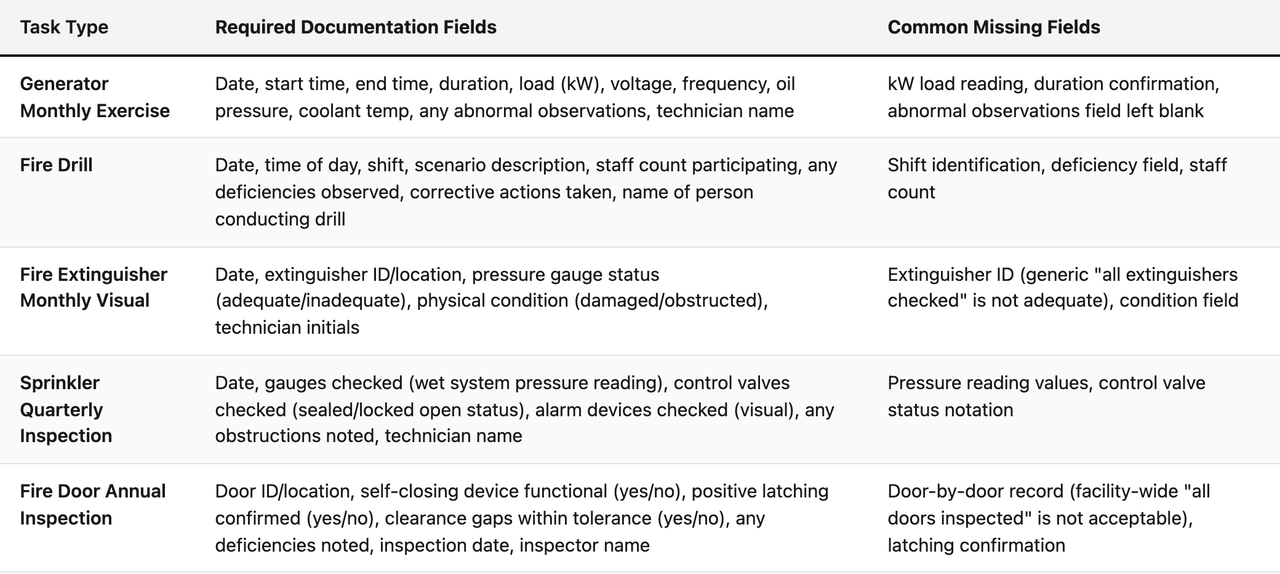
A checkbox is not documentation. This is the lesson that every SNF maintenance director learns the hard way during their first CMS survey. A surveyor does not want to see that a monthly generator exercise was marked complete. They want to see the date, the time the exercise started and ended, the load applied, any abnormal observations, and the name of the staff member who performed the exercise. If any of those fields are missing, the documentation is deficient regardless of whether the exercise actually happened.
Defining Required Data Fields by Task Type
For each task in your schedule, define the specific data fields that must be completed before the task can be marked done. Structure these fields based on what a CMS surveyor or state inspector would ask to see:
Enforcing Completion Standards in Your System
If your scheduling software allows it, configure required fields as mandatory, the task cannot be marked complete unless every required field contains a value. This is not bureaucratic friction. It is the mechanism that prevents the most common documentation deficiency pattern in SNF life safety programs: the well-intentioned technician who performed the inspection correctly but recorded it incompletely because they were busy and expected to come back to fill in details that they never did.
For tasks completed by outside contractors, add a parallel task for the maintenance director to receive, review, and file the contractor's written report, and to open a corrective action if any deficiencies are noted. The contractor report should be attached to the task record in your system, not stored in a separate folder or filing cabinet.
Estimated time for Step 4: two to three hours to define documentation standards for all task types and configure required fields in your system.
Step 5: Build Your Deficiency-to-Resolution Workflow
A deficiency found during an inspection is not a compliance problem by itself. A deficiency found and not resolved, or resolved but not documented, is a compliance problem. The workflow that connects deficiency identification to documented resolution is the piece that most SNF life safety programs lack, and it is the piece that produces the most avoidable citations.
What a Deficiency Workflow Must Include
When any inspection task (in-house or contractor) produces a deficiency finding, the following steps must occur and be documented in your system:
- Deficiency recorded at the time of inspection. The technician or contractor notes the specific deficiency (not just "issue found" but a description specific enough that someone who was not present can understand what was wrong, where it was located, and what the risk is).
- Corrective action work order opened automatically. The deficiency should trigger the creation of a corrective action task in your scheduling system, assigned to the appropriate role (in-house repair or contractor callback), with a target completion date based on the severity of the finding.
- Interim life safety measure documented if applicable. For critical deficiencies (a fire door that does not self-close, a sprinkler head that is obstructed, a generator that fails to start), an interim life safety measure (ILSM) evaluation may be required. Your schedule should include a task for ILSM evaluation triggered by critical deficiency findings, per CMS survey and certification guidance on ILSMs.
- Resolution documented with specifics. When the corrective action is completed, the resolution must be documented with the same specificity as the deficiency: what was done, by whom, when, and confirmation that the issue is resolved.
- Verification inspection scheduled. For significant deficiencies, the resolution should be verified by a follow-up inspection, documented separately from the corrective action.
Tracking Open Deficiencies Across the Facility
Maintain a live open-deficiency register that the maintenance director can review at any time. This register should show every open deficiency across all life safety systems, the age of each deficiency, the assigned corrective action owner, and the target resolution date. When a surveyor arrives unannounced, being able to show a current open-deficiency register with documented corrective actions in progress is significantly better than having no register at all. It demonstrates an active, functioning compliance program rather than a reactive one.
Estimated time for Step 5: one to two hours to design the deficiency workflow and configure it in your scheduling system.
Step 6: Implement the Schedule and Train Staff Using Role-Based Protocols
A well-designed schedule that no one follows is worse than a mediocre schedule that everyone follows, because it creates false documentation while compliance gaps accumulate. Implementation must be structured, role-specific, and focused on the practical mechanics of completion logging rather than the regulatory theory behind each task.
The 90-Day Implementation Plan
For a single SNF facility, a realistic implementation timeline looks like this:
- Days 1-14: Parallel operation. Run your new schedule alongside your existing system (even if the existing system is a paper binder). Complete tasks using the new system but do not yet retire the old one. This catches configuration errors before they affect compliance records.
- Days 15-30: Staff training by role. Each role receives training specific to their task queue. Maintenance technicians learn how to log a completed inspection with all required fields. The maintenance director learns how to review open tasks, monitor overdue items, and manage the deficiency workflow. EVS staff learn how to complete their assigned tasks at the facility kiosk or mobile device.
- Days 31-60: Supervised solo operation. Staff complete tasks independently in the new system. The maintenance director reviews all completions for the first 30 days to catch documentation quality issues before they become a pattern.
- Days 61-90: Full transition and audit. Retire the paper system. Conduct an internal documentation audit simulating a CMS survey, pull every task completion record for the prior 60 days and verify that every required field is complete and every regulatory cadence has been met.
Training Maintenance Staff Who Are Not Technologically Confident
A significant proportion of SNF maintenance staff are experienced tradespeople who are comfortable with physical inspections but less comfortable with digital systems. Training for this group should be entirely task-focused: here is the device (kiosk, tablet, or phone), here is the specific task you need to log, here are the fields you need to fill in, here is what happens when you submit. Avoid regulatory lectures in technician training. The technician does not need to understand why the kW reading is required, they need to know where to find it on the generator panel and where to enter it in the system.
Post laminated quick-reference cards at the facility kiosk and on high-frequency inspection equipment (generator panel, fire alarm control panel, main sprinkler riser room). Each card shows the task name, the required fields, and the acceptable range or notation for each field. When a new technician starts, the card is their primary reference until the task becomes routine.
The Turnover Handoff Protocol
Formalize what happens when a maintenance staff member leaves. The handoff protocol should include:
- A review of all open tasks assigned to the departing employee, transferred to the role queue for coverage by remaining staff or a temporary assignment.
- A review of all open deficiencies the departing employee was tracking, with status updates documented in the system before their last day.
- A documentation completeness check for the prior 90 days of task records to identify any incomplete or missing records before the gap becomes a surveyor-visible problem.
- An updated role-based onboarding packet generated for the incoming hire, reflecting current open items and any cadence windows approaching in the next 30 days.
Estimated time for Step 6: two weeks of active management for the parallel operation phase, then ongoing as standard operations.
Step 7: Run a Self-Survey Before Any Inspection Visit
The most effective way to confirm that your schedule is working is to periodically audit it the way a CMS surveyor would. This is not a theoretical exercise. CMS surveyors follow a structured review process during life safety surveys, and that process is largely predictable. Understanding it lets you audit your own documentation gaps before they become citations.
What CMS Surveyors Look For During Life Safety Reviews
The CMS Nursing Home Survey process for life safety includes a review of documentation for each regulated system and a physical observation of conditions. Surveyors commonly request:
- The last 12 months of fire drill records, specifically checking for four drills per quarter across all three shifts.
- The last 12 months of generator exercise logs, checking for monthly exercises and the annual load test.
- The last inspection report for fire alarm, sprinkler, and suppression systems, plus documentation of any deficiencies found and their resolution.
- Fire door inspection records for all fire-rated doors in the facility.
- Medical gas system inspection records.
- Evidence of an ILSM evaluation process for any periods when a life safety system was out of service.
Conducting Your Internal Documentation Audit
At least quarterly, the maintenance director should pull a full documentation report from the scheduling system and work through this checklist:
- Are all four quarterly fire drills completed for the current quarter, covering all three shifts? If not, which shifts are missing?
- Is every month in the last 12 months represented by a generator exercise record with complete data fields?
- Has the annual load bank test been completed within the last 12 months? Is the contractor report filed and attached?
- Has the annual fire alarm test been completed? Is the contractor report filed? Are any deficiencies documented and resolved?
- Has the annual sprinkler inspection been completed? Is the contractor report filed? Are deficiencies documented and resolved?
- Are quarterly sprinkler inspections (in-house) completed for the last four quarters with complete data?
- Have all fire doors been inspected within the last 12 months with door-level records?
- Are there any open deficiencies older than 30 days without a documented corrective action?
Any gap identified in this internal audit is a gap a surveyor would find. Address it before it becomes a citation. If your scheduling software includes an analytics layer that surfaces these gaps automatically, the internal audit process is significantly faster, the system flags the gaps, and the maintenance director's job is to resolve them rather than to find them.
Estimated time for Step 7: two to three hours per quarterly internal audit once your system is running.
Multi-Site Considerations for SNF Operators
For regional or national SNF operators managing multiple facilities, the scheduling challenge multiplies by site count but the solution architecture is the same, just applied at a higher level of abstraction. Each facility's schedule runs on the same role-based, regulation-anchored template, with site-specific variations (state-specific requirements, facility-specific asset inventories) applied as overlays rather than as separate programs.
Standardizing Across Sites Without Losing Facility-Specific Compliance
The temptation in multi-site operations is to standardize everything. The risk is that a standardized schedule built for one state's requirements may be non-compliant in another state. The correct approach is a standard template with mandatory state-specific modules. Every facility in your portfolio runs the same core NFPA task library. Facilities in states with additional inspection requirements run the core library plus a state-specific add-on module.
This structure also simplifies regional oversight. A regional director of facilities can see a single dashboard showing schedule completion rates, overdue task counts, and open deficiencies across all facilities in their portfolio. When one facility's completion rate drops (often the first signal of a staffing problem), the regional director can intervene before the compliance gap grows large enough to appear in a survey finding.
Turnover Risk at Scale
Multi-site SNF operators face a compounded version of the turnover problem: maintenance director turnover at any single facility creates a compliance risk at that facility, and the regional team may not know about it until a survey finding arrives. A role-based, system-documented schedule makes the turnover event visible at the regional level, the open task queue for the departing role appears in the regional dashboard, and corrective action can be taken centrally before local coverage breaks down.
The platforms designed for this use case, including purpose-built maintenance scheduling software for SNF operators, offer multi-facility views with escalation logic: if a task is overdue at the facility level and not resolved within a defined window, it escalates to the regional director's view automatically. This removes the dependency on the facility-level maintenance director to self-report problems during a period when they may be understaffed and overwhelmed.
How Software Changes the Equation for SNF Staff Turnover Compliance
SNF staff turnover compliance is fundamentally an information continuity problem. When a maintenance director leaves, the compliance knowledge gap is not in the tasks themselves, the tasks still exist. The gap is in the context: which tasks are overdue, which deficiencies are open, which contractor visits are coming up, what the last surveyor flagged, and what the interim life safety measures are for any currently impaired systems. In a paper-binder system, all of that context is fragmented across physical records, personal memory, and informal communication. In a digital scheduling system, it is all in one place, role-accessible, and continuously updated.
What Purpose-Built Healthcare Scheduling Software Adds
Generic work order software can capture task completions and store records. Purpose-built healthcare life safety platforms add a layer that generic tools do not: regulatory intelligence. A platform built specifically for SNF compliance knows that a fire drill record without a shift designation is non-compliant. It knows that a generator exercise record without a kW load reading is incomplete. It can cross-reference the completion record against the regulatory standard and flag the documentation gap before the record is finalized.
This regulatory intelligence layer is what makes the difference between a system that documents compliance and a system that audits it. The distinction matters most during staff transitions. A new maintenance director logging into a purpose-built platform sees not just a task queue but a compliance status view: these tasks are current, these are approaching due dates, these are overdue, and these records have documentation gaps that need to be resolved. They can begin managing compliance from day one without needing to reconstruct the facility's compliance history from paper logs.
The Kiosk Model for Shared Maintenance Teams
Many SNFs have small maintenance teams where the same one or two technicians handle everything from plumbing repairs to life safety inspections. These teams are not sitting at computers. They are moving through the building. A scheduling platform that requires desktop access to log task completions will not be used consistently by these teams.
The facility kiosk model, a shared tablet or touchscreen mounted in the maintenance shop or at a high-traffic point in the building, allows technicians to log completions immediately after performing an inspection, without returning to an office or carrying a personal device. The kiosk interface should be optimized for speed: the technician selects their task, fills in the required fields, submits, and moves on. The entire interaction should take under two minutes for a routine inspection log.
Frequently Asked Questions About Life Safety Task Scheduling in SNFs
How often does CMS actually cite SNFs for life safety documentation deficiencies?
Life safety deficiencies are among the most frequently cited categories in CMS nursing home surveys. The CMS Five-Star Quality Rating System incorporates health inspection findings, and life safety citations directly affect survey outcomes. Documentation deficiencies, where the inspection occurred but the record is incomplete, are consistently among the most common findings because they are the easiest for a surveyor to identify from records review alone.
What is the difference between a life safety task schedule and a preventive maintenance schedule?
A preventive maintenance schedule focuses on equipment condition, changing filters, lubricating moving parts, replacing worn components to prevent failure. A life safety task schedule focuses on regulatory compliance, performing and documenting the specific inspections required by NFPA codes and CMS Conditions of Participation. The two overlap but are not the same. An SNF can have excellent preventive maintenance practices and still receive life safety citations because the regulatory inspection cadences and documentation standards are not met.
Can a maintenance technician build this schedule themselves, or does it require a consultant?
A maintenance technician with strong regulatory knowledge can build a solid schedule independently using the NFPA 101 and NFPA 99 codes as references. The challenge is that the codes are complex, state-specific overlays add another layer, and the documentation standards for each task require interpretation. A life safety consultant can compress the build time significantly and reduce the risk of missing a required task. Purpose-built scheduling platforms that include a pre-built, regulation-anchored task library offer a middle path: the regulatory interpretation work has been done, and the facility customizes the template to its specific asset inventory and state requirements.
What happens to compliance records when we switch from a paper binder to a digital system?
Historical paper records should be retained for the period required by your state (typically three to five years for life safety records, though state requirements vary). They do not need to be entered into your new digital system, they can remain as physical records for the historical period. Your digital system begins building a new, complete record from the date of implementation. During an unannounced survey, you present digital records for the period since implementation and paper records for the period before. Make sure the transition date is clearly documented so there is no ambiguity about which system covers which period.
How do we handle life safety tasks during a period when the maintenance director position is vacant?
This is exactly the scenario a role-based schedule is designed to handle. When the maintenance director position is vacant, the task queue for that role does not disappear, it becomes visible to whoever is covering the role (a temporary staff member, a regional director, or a contracted interim maintenance manager). The covering person logs in, sees the current open task queue and any overdue items, and begins managing from that point. The schedule does not reset or lose continuity. If your system supports it, configure an escalation alert so that tasks in the maintenance director queue that are approaching their due date are flagged to a regional or administrative contact when the position is vacant.
Do fire drill records need to include residents, or just staff?
Fire drills in SNFs are staff drills, residents are not evacuated during practice drills. However, the drill documentation must reflect resident safety: surveyors look for evidence that staff responded appropriately to the resident population, including residents with mobility limitations, cognitive impairments, or oxygen dependency. Drill records should note the number of staff participating, the simulated scenario, how staff handled resident protection during the drill, any deficiencies observed, and corrective actions taken.
How do we handle life safety tasks for newly acquired facilities?
A newly acquired facility is a high-risk environment for life safety compliance because the previous operator's documentation practices may be unknown or inadequate. The first priority is a documentation audit: pull all available records and assess which regulatory cadences are current and which are overdue. Then conduct a physical asset inventory to identify any equipment categories not covered by existing records. Build a new schedule from the regulatory reference map (Step 1) and set all cadences based on the most recent verifiable completion date for each task, not an assumed date. For any task where no verifiable completion date exists, treat the task as overdue and complete it immediately.
What is an Interim Life Safety Measure (ILSM) and when is it required?
An Interim Life Safety Measure is a compensatory action taken when a life safety system is temporarily impaired, for example, when a fire door is removed for repair, a section of sprinkler system is shut down for maintenance, or a fire alarm zone is taken offline. ILSMs ensure that resident and staff safety is maintained during the impairment period. They typically include increased fire watches, temporary barriers, enhanced staff training, and additional fire drills. CMS requires that facilities have a documented ILSM evaluation process and that ILSMs are implemented and documented whenever a life safety system is impaired, regardless of how briefly.
How far back do surveyors typically look when reviewing life safety records?
CMS surveyors typically review the last 12 months of life safety records during a standard survey. This covers one full cycle of all annual requirements and four cycles of all quarterly requirements. For facilities on the Special Focus Facility list or under enhanced oversight, the review period may extend further. Your schedule should maintain at least 24 months of accessible records to provide a buffer beyond the standard review window.
What is the best way to track contractor-performed inspections in our scheduling system?
Contractor-performed inspections should be tracked with two linked tasks: a scheduling task (confirm contractor appointment, confirm date and scope) and a completion task (receive contractor report, review for deficiencies, file report in system, open corrective actions if needed). The contractor's written report should be attached to the completion task record as a document. This creates an unbroken chain of evidence from the scheduling of the inspection to the filing of the report and resolution of any findings, the exact chain a surveyor looks for when reviewing contractor inspection records.
Is a mobile app necessary, or can staff log completions at a shared kiosk?
Either approach works, and the right choice depends on your team's workflow. A shared facility kiosk is practical for small maintenance teams where staff return to a central location between tasks. A mobile app is better for facilities where technicians cover large buildings or multiple floors and need to log completions at the point of inspection rather than returning to a central location. Some facilities use both: a kiosk for routine daily and weekly tasks and a mobile app for monthly and quarterly inspections that require field data entry. The key requirement is that the logging mechanism is available where and when staff are completing inspections, not just in an office.
How do we verify that EVS staff are completing their assigned life safety tasks correctly?
EVS staff assigned life safety tasks (exit sign checks, egress path inspections, eyewash flushes) should complete those tasks in the same scheduling system as maintenance staff, using the same required-field structure. The maintenance director should review EVS task completions weekly during the first 60 days after implementation to verify that records are complete and that EVS staff understand the documentation standard. After that initial period, a spot-check review monthly is sufficient for routine verification. Any pattern of incomplete records should trigger a targeted retraining session rather than a general reminder, address the specific field that is consistently missing.
Key Takeaways
- Assign tasks to roles, not individuals. This is the structural change that makes a life safety schedule turnover-proof. When a person leaves, the role and its task queue remain, and the next person steps into a defined compliance position rather than an empty desk.
- Anchor every task to its regulatory source. Tasks without a regulatory anchor cannot be defended during a survey and cannot be explained to a new hire. The regulatory citation is the reason the task exists, and it should be visible in the schedule.
- Build buffer windows into every cadence. The monthly-task-completed-in-month-five-of-a-four-week-calendar problem is avoidable with explicit completion windows. Define the window, not just the frequency.
- Documentation is not a checkbox. Define required data fields for every task type based on what a surveyor would ask to see. Configure your system to enforce those fields before a task can be marked complete.
- Deficiency-to-resolution is its own workflow. Finding a deficiency without documenting its resolution is a citation waiting to happen. Build the corrective action workflow into your schedule, not as a separate process.
- Contractor inspections are part of your compliance calendar. Schedule the contractor visit, receive the report, review it for deficiencies, and document resolution, all in your system, not in a file cabinet.
- Run a quarterly self-survey. An internal documentation audit before a surveyor arrives is the most reliable way to find and close gaps while there is still time to act.
- Multi-site operators need a standard template with state-specific overlays. Standardize the core program, customize for state requirements, and use regional dashboard visibility to catch turnover-driven compliance gaps before they become survey findings.
Building a Schedule That Outlasts Any Individual
The goal of a turnover-proof life safety task schedule is not to eliminate the need for skilled maintenance professionals. It is to ensure that the institutional knowledge those professionals carry does not walk out the door with them when they leave. A well-built schedule, properly maintained in a system that lives outside any one person's control, means that the next maintenance director inherits a functioning compliance program rather than a mystery. They can be productive from day one, not because they are exceptional, but because the system is.
The facilities that perform consistently well on life safety surveys are not necessarily the ones with the most experienced maintenance directors. They are the ones with the best systems. The maintenance director is the person who manages the system, responds to what it surfaces, and closes the gaps before a surveyor finds them. That is a role that can be filled by the right person at any experience level, as long as the system they are stepping into is built correctly.
Start with the regulatory reference map. Build the role-based structure. Define the documentation standards. Configure the deficiency workflow. Run the internal audit. These are not complicated steps, but they require deliberate design. The paper binder never had that design. That is why it does not survive turnover. Your schedule should.
About the author
Benjamin Terebelo · Founder
Benjamin is the founder of SEQURA, a compliance platform purpose-built for healthcare facilities. He builds at the intersection of healthcare operations and software, maintaining a focus on bringing modern tooling to systems that the broader industry has largely left behind.
About the author
Benjamin Terebelo · Founder
Benjamin is the founder of SEQURA, a compliance platform purpose-built for healthcare facilities. He builds at the intersection of healthcare operations and software, maintaining a focus on bringing modern tooling to systems that the broader industry has largely left behind.