
How to Replace a Paper Fire Drill and Generator Log System With a Digital Audit Trail

Most SNF maintenance directors can tell you exactly where their fire drill log is. It's in the binder. The big one. The one with the torn spine and the sticky note on the front that says "SURVEYORS." The problem isn't that they don't know where the documentation is. The problem is that three of the last twelve fire drill entries are missing the time of day, one generator test log has a blank where the kilowatt load reading should be, and nobody noticed either of those gaps until a CMS surveyor pointed them out during an unannounced visit.
That scenario plays out in skilled nursing facilities across the country with remarkable consistency. Not because maintenance teams are careless, but because paper documentation systems have no internal quality control. They cannot tell you what's missing. They cannot cross-reference a completed task against the regulatory requirement it's supposed to satisfy. They record what was written down, and they leave everything else to the surveyor to find.
This guide walks through the complete process of replacing a paper fire drill and generator log system with a digital audit trail that satisfies CMS and state survey standards under CMS Life Safety and Emergency Preparedness requirements. Every step includes the specific decisions you'll need to make, the common mistakes that derail transitions like this, and the documentation standards that determine whether your records hold up under scrutiny.
Step 1: Understand What "Contemporaneous Documentation" Actually Means to a CMS Surveyor
Before you can replace a paper system, you need to understand the documentation standard you're replacing it with. "Contemporaneous" is not a synonym for "digital." It means the record was created at or near the time the activity occurred, by the person who performed it, in a way that reflects the actual conditions observed. That distinction shapes every decision in this transition.
CMS surveyors reviewing fire drill and generator testing records are not just checking that the activity happened. They are checking whether the documentation pattern is consistent with a facility that actually performs these activities as required, or one that completes the paperwork after the fact. The difference shows up in specific ways:
- Timestamps: Fire drill logs that show completion times clustered in the middle of a business day, with no night-shift or weekend drills, suggest batch entry rather than real-time documentation. Under NFPA 101, drills must cover all shifts and staff. A surveyor who sees twelve drills all completed between 9 a.m. and 3 p.m. will ask questions.
- Specificity: Generator test logs that record "test completed" without noting kilowatt load, transfer time, coolant temperature, and whether the automatic transfer switch operated correctly are incomplete under NFPA 99 requirements. The data fields exist for a reason. Blank fields are citations waiting to happen.
- Consistency: If your fire drill log shows a drill in one month but your shift log shows no staff activity outside normal hours on that date, a thorough surveyor will notice the discrepancy.
- Attribution: Who conducted the drill? Who witnessed the generator test? Paper systems often record a signature that is illegible or a name that doesn't match any current staff member. Digital systems can tie records to authenticated user accounts.
The goal of switching to fire drill log software is not to produce the same paper record in digital form. It is to produce a more defensible record that captures the right data fields at the right time, tied to an authenticated user, with a timestamp that reflects when the activity actually occurred.
What the Regulatory Framework Requires
CMS enforces life safety standards through the State Operations Manual Appendix PP for long-term care facilities. Fire drill and generator testing documentation falls under specific K-tags that surveyors use to cite deficiencies. The most commonly cited include K-tags related to fire drill frequency and shift coverage, generator testing intervals and data completeness, and transfer switch testing records.
Understanding which K-tags your current paper system is designed to satisfy is the first prerequisite for a successful digital transition. If you don't know which regulatory requirement each paper form is mapped to, you cannot verify that your digital replacement covers the same ground.
Action item before moving to Step 2: Pull your current paper fire drill and generator log forms. For each form, write down the NFPA standard section and K-tag it is designed to document. If you cannot identify the regulatory basis for a form, that is a gap you need to close before you digitize anything.
Step 2: Audit Your Current Paper System Before You Replace It
Digitizing a broken system produces a digital broken system. The single most common mistake in maintenance management digital transformation projects at SNFs is importing existing paper workflows directly into new software without first auditing whether those workflows actually satisfy current regulatory requirements.
This step should take two to four hours for a single-facility operator and up to a full day for a multi-site team reviewing records across several locations. The output is a gap inventory: a list of every place where your current paper documentation either fails to capture required data, fails to cover required time periods, or fails to demonstrate that activities occurred when they should have.
How to Conduct the Paper Audit
Pull twelve months of fire drill logs. For each entry, verify the following:
- Is there a record for every quarter? (NFPA 101 requires one drill per quarter per shift for most occupancy types.)
- Does each record include the date, time of day, number of staff participating, and location within the facility?
- Are all three shifts represented across the annual cycle? A common finding is that night-shift and weekend drills are missing or underrepresented.
- Does the record identify who conducted the drill and who evaluated it?
- Are there notes on evacuation issues, staff performance problems, or corrective actions? The absence of any corrective action notes across an entire year is itself a red flag to surveyors, because it suggests the drills were not being evaluated critically.
Then pull twelve months of generator testing documentation and verify:
- Monthly operational testing records with runtime (30-minute minimum for load-bank or building load testing).
- Kilowatt load readings at the time of test. NFPA 99 requires that the generator be tested at a load of at least 30% of its nameplate rating. If load readings are absent, the record does not prove compliance.
- Automatic transfer switch (ATS) operation confirmed during each test.
- Battery and coolant checks.
- Annual load bank test records if the facility cannot achieve 30% load through connected building systems.
- Records of any generator failures, alarm conditions, or repairs, and evidence that those were addressed.
Document Every Gap Before You Move On
Create a simple gap log with three columns: the regulatory requirement, what your paper system currently captures, and what is missing. This becomes the specification document for your digital system configuration. Every gap you identify here needs to be closed by a required data field or a system prompt in your digital platform.
This step also reveals something more uncomfortable for many maintenance directors: how many of the "completed" records in the binder are actually incomplete. It is not unusual to find that 20–30% of entries have at least one missing data field. That number is not a judgment on anyone's competence. It reflects the fundamental limitation of paper systems, which rely entirely on the person filling out the form to know what needs to be there and to do it correctly every time without any system-level validation.
Step 3: Select a Digital Platform Built for Life Safety Documentation (Not Just Work Orders)
Not every digital maintenance platform is appropriate for life safety documentation in a healthcare setting. Generic computerized maintenance management systems (CMMS) can track work orders and preventive maintenance schedules, but they are not designed around the specific regulatory structure of NFPA 99 compliance, CMS K-tag requirements, or the contemporaneous documentation standard that determines whether a record holds up during survey.
When evaluating platforms for fire drill log software and generator testing documentation, the key distinctions to assess are:
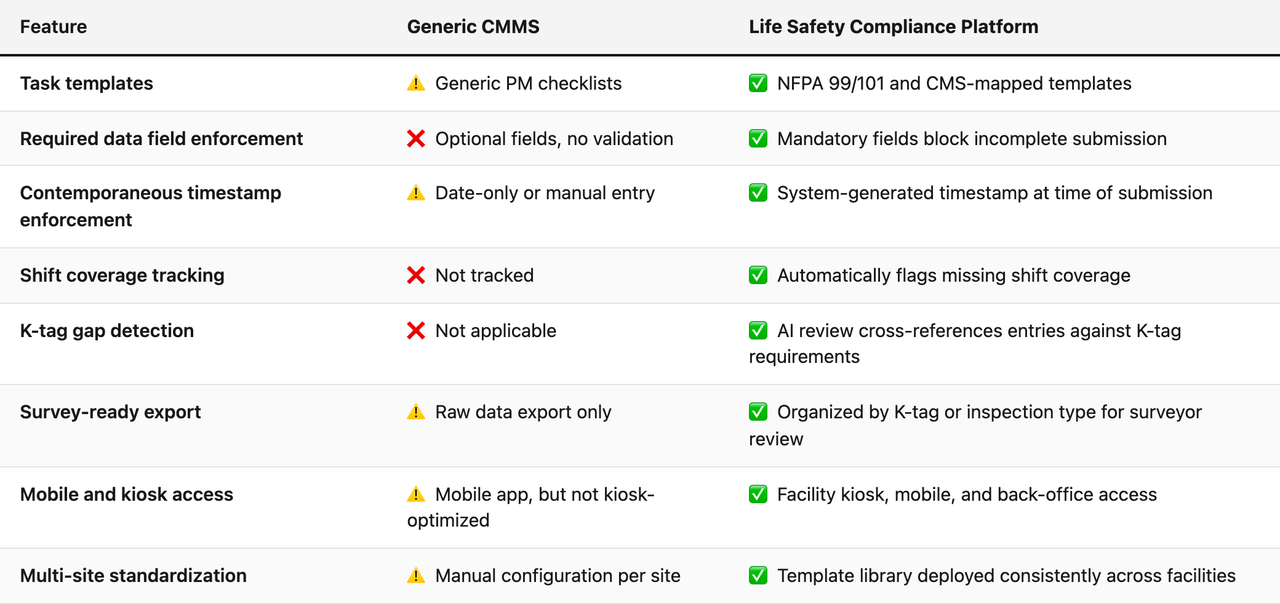
The distinction that matters most for CMS survey readiness is required data field enforcement. A system that allows staff to submit a fire drill record with a blank time-of-day field has not solved the paper problem. It has moved the paper problem to a screen. The platform needs to make incomplete records impossible to submit, not just inconvenient.
Questions to Ask Any Vendor Before Committing
- Are your task templates mapped to specific NFPA 99 and NFPA 101 sections, and which version of each standard?
- Does the system enforce required data fields, or are fields optional?
- How does the system handle a staff member who submits a record hours after the activity occurred? Is there an audit trail distinguishing the activity time from the submission time?
- Can the system produce a report organized by K-tag category for a surveyor who arrives unannounced?
- Does the platform include any automated review that identifies documentation gaps before survey?
- What happens to existing paper records during the transition? Can historical records be uploaded or referenced?
Step 4: Configure Fire Drill Templates With Every Required Data Field
The template configuration step is where the regulatory requirements from Step 1 get built into the system. This is not a task to delegate to a vendor onboarding specialist without your direct input. The person configuring fire drill templates needs to understand NFPA 101 requirements for your specific occupancy type and what your state survey agency has historically cited in your region.
A compliant fire drill record for a skilled nursing facility must capture, at minimum:
- Date and time of drill (system-generated, not manually entered)
- Shift covered (day, evening, or night, with the system tracking cumulative shift coverage across the calendar year)
- Number of staff participating
- Floors or units involved
- Whether residents were involved or simulated
- Identity of the person conducting the drill (authenticated user, not a typed name)
- Time to complete evacuation or clear the zone
- Any observed deficiencies in staff response (this field should require either a description of a deficiency or an explicit "none observed" selection, not a blank)
- Corrective actions identified (if any deficiencies noted)
- Reviewer or approver (for facilities that require supervisory sign-off)
Two fields that paper systems almost universally handle poorly are the shift coverage tracker and the deficiency/corrective action pairing. Paper binders record drills in chronological order. They do not automatically calculate whether all three shifts have been covered in a given quarter. A digital system should do that calculation automatically and alert you when a shift is coming due.
Configuring the Shift Coverage Logic
Most SNFs have three shifts: day (typically 7 a.m. to 3 p.m.), evening (3 p.m. to 11 p.m.), and night (11 p.m. to 7 a.m.). NFPA 101 requires that fire drills cover all shifts and reach all staff. The practical interpretation applied by most surveyors is that over the course of a year, each shift should be represented in drill records.
Your digital system should be configured to track shift coverage as a running metric, not just a historical log. The dashboard should show, at a glance: which shifts have been covered this quarter, which are coming due, and whether any quarter is at risk of ending without full coverage. That visibility is what transforms a passive log into an active compliance management tool.
Pro Tip: Build in a Drill Quality Score
Beyond the required data fields, consider adding a structured evaluation component to your fire drill template. A simple 1–5 rating on staff response time, knowledge of evacuation procedures, and resident management protocol creates a documented record of drill quality over time. This serves two purposes: it demonstrates to surveyors that drills are being taken seriously as training exercises, and it creates a baseline that shows improvement over time, which is positive evidence of a functioning life safety program.
Step 5: Configure Generator Testing Templates to Capture NFPA 99 Required Data
Generator testing documentation is the single most common source of life safety citations in SNFs, and the most preventable. The required data is not ambiguous. NFPA 99 Chapter 8 specifies exactly what needs to be recorded for monthly operational tests and annual load testing. The problem is that paper forms rarely enforce completeness, and the specific data points that matter most (kilowatt load, transfer time, ATS operation) are often the ones left blank when a technician is working quickly.
A compliant generator test record must include:
- Date and start time of test (system-generated)
- Generator identification (asset tag, make, model, and location if multi-generator facility)
- Test duration (minimum 30 minutes for monthly operational test)
- Starting kilowatt load and ending kilowatt load
- Confirmation that load met 30% of nameplate rating (or documentation of load bank test if building load is insufficient)
- Automatic transfer switch operation confirmed (yes/no with space for notes)
- Coolant temperature at end of test
- Battery voltage at start of test
- Oil pressure reading
- Any alarms or warning indicators during test
- Name of technician performing test (authenticated user)
- Post-test return to normal utility power confirmed
In a digital system, the kilowatt load fields should be numeric-only, with a validation rule that flags any entry below 30% of the configured nameplate rating for that generator. This single automated check would prevent the majority of NFPA 99 generator documentation citations.
Handling Load Bank Testing Records
If your facility uses a contracted load bank testing service for the annual test (or for monthly tests when building load is insufficient), the documentation workflow is different. The contractor produces a report, which your team needs to integrate into the digital record alongside your own operational data.
Configure your system to include a contractor report upload field as a required attachment on annual load bank test records. The record is not complete until both the facility's operational checklist and the contractor's report are present. A system that allows the record to close without the contractor report attached leaves a gap that a surveyor will find.
Setting Up Transfer Switch Maintenance Records
Automatic transfer switch testing and maintenance records are often kept separately from generator test logs in paper systems, which creates a cross-reference problem during survey. In your digital system, link ATS maintenance records to the generator asset record so that both appear together in any survey-ready report. A surveyor asking for generator documentation should see the complete picture: monthly tests, annual load test, and ATS maintenance history, all in one place.
Step 6: Establish the Contemporaneous Entry Protocol
A digital system only produces a contemporaneous audit trail if staff actually enter records at the time of the activity. This is a behavioral and operational challenge, not just a technical one, and it is where many digital transitions fail. The software is configured correctly, but staff continue to batch-enter records at the end of their shift or week, which produces a digital record that looks just as suspicious to a surveyor as a paper log filled out in the same pen.
The solution is access and workflow design. Staff need to be able to complete a record in the time and place where the activity occurs. For a maintenance technician running a monthly generator test, that means either a mobile device they carry to the generator room or a facility kiosk near the mechanical room that they can access immediately after completing the test.
Choosing Your Entry Points
Most SNF digital maintenance systems support three entry modes:
- Mobile app: Best for technicians who move throughout the facility. The record is created on-site, at the time of the activity, with GPS and timestamp data captured by the device.
- Facility kiosk: Best for shared-access environments where not every staff member has a personal device. A wall-mounted or counter-mounted tablet near the mechanical room or nurse's station allows quick entry without requiring personal devices.
- Back-office computer: Appropriate for the maintenance director completing administrative records, reviewing flagged items, or uploading contractor reports. Not appropriate for field documentation that should be created at the point of activity.
For fire drills, the practical challenge is that the person conducting the drill needs to complete the record while the details are fresh, often in a common area or unit hallway. A mobile app is the most practical solution. If the facility does not want to issue individual devices to all maintenance staff, a shared department tablet works, provided each user logs in with their own credentials so records are attributed correctly.
The 15-Minute Rule
Establish a facility policy that any life safety documentation record must be submitted within 15 minutes of completing the activity. This is not arbitrary. It creates a defensible contemporaneous record because the submission timestamp will be within a plausible margin of the activity completion time. A record submitted four hours after a generator test cannot be called contemporaneous with the same confidence as one submitted within minutes.
Document this policy in writing. If your digital platform produces an audit log showing submission timestamps, and all records are within 15 minutes of the scheduled activity time, that pattern itself is evidence of a well-run compliance program.
Step 7: Run the Digital System in Parallel With Paper for 30 Days
Do not go fully digital on day one. A 30-day parallel period is the safest transition approach for a regulated environment. During this period, staff complete both the existing paper records and the new digital records for every fire drill and generator test. The purpose is threefold: to verify that the digital system is capturing all required data correctly, to identify any configuration gaps before the paper backup is removed, and to build staff confidence in the new workflow.
At the end of the 30-day period, compare every digital record against its corresponding paper record. Look for:
- Any required data field that appears on the paper form but is not captured in the digital system
- Any discrepancies in timestamps (the digital timestamp should match or closely follow the time recorded on paper)
- Any records that were completed on paper but not entered into the digital system (indicating staff who are not yet following the new workflow consistently)
- Any digital records with fields that were left blank in ways the system should have prevented (indicating a configuration error in the required field settings)
This parallel period also gives you a full month of digital records to review with your life safety consultant or compliance officer before the paper system is retired. A fresh set of eyes on the first month of digital records often catches configuration issues that are invisible to the person who built the templates.
Common Configuration Errors Found During Parallel Periods
- Shift coverage logic not configured for the facility's actual shift times (some facilities run 12-hour shifts, not 8-hour shifts)
- Generator nameplate kW rating entered incorrectly, causing the 30% load validation to flag correct readings or pass incorrect ones
- Fire drill template missing a required field for facilities with multiple buildings or campuses
- User accounts not set up for all staff who perform these activities, causing records to be attributed to a generic account
- Contractor report upload field not marked as required, allowing records to close without the attachment
Step 8: Retire the Paper System and Establish the Digital-Only Protocol
The transition is complete when the digital record is the only record, and every stakeholder knows it. This step is less about technology and more about organizational change management. When the paper binder is retired, there needs to be a clear documented decision that the digital system is the system of record, who is responsible for it, and what the escalation process is when a required record is flagged as incomplete or overdue.
Communicate the transition formally. A memo to all maintenance staff, EVS staff, and department heads involved in life safety activities should confirm the effective date of the digital-only protocol, the procedure for accessing records, and who to contact if they encounter a technical issue that prevents timely entry.
Preserving Historical Paper Records
Do not throw away the paper binder. CMS surveyors may request records going back 12 to 36 months depending on the survey type. Your historical paper records need to be retained for the applicable lookback period and remain accessible. Options include:
- Scanning and uploading historical records to the digital platform as PDF attachments, organized by record type and date
- Retaining the physical binder in a labeled archive with a clear retention date
- A hybrid approach where the digital system contains a "historical records" section linking to scanned documents for periods before the transition date
Whatever approach you choose, document it. If a surveyor asks for a fire drill record from 18 months ago and you can produce it in under two minutes, the transition is successful. If you have to explain why that particular record no longer exists, you have a problem.
Assigning Ownership and Escalation Responsibilities
The digital system needs a named owner at the facility level: typically the maintenance director or plant operations manager. That person is responsible for reviewing the system's gap alerts daily, ensuring overdue records are addressed before they age into citations, and producing documentation for surveyors on demand. For multi-site operators, a regional facilities manager or compliance officer should have dashboard access across all facilities and a defined escalation protocol when a site-level gap is not resolved within a set timeframe.
Step 9: Use the Audit Layer to Find Gaps Before the Surveyor Does
Completing the transition to digital documentation is not the finish line. The finish line is having a system that finds its own gaps. This is the capability that separates a digitized paper system from a true digital audit trail. A system that records what was submitted is an improvement over paper. A system that cross-references submissions against regulatory requirements and flags missing or inadequate records is a fundamentally different tool.
The audit layer in a purpose-built life safety compliance platform does several things that no manual review process can replicate consistently:
- Cross-references completed records against the regulatory schedule. If a monthly generator test is due on the 15th and it's the 20th with no record submitted, the system flags it as overdue. The maintenance director sees this before the surveyor does.
- Reviews submitted records for completeness against the K-tag standard. A record that was submitted with all fields populated can still be inadequate if the kilowatt load entered is below the required threshold. An AI review layer catches this where a manual spot-check would not.
- Identifies pattern anomalies. If fire drill records consistently show completion times of exactly 4 minutes across twelve drills, that pattern may indicate records are being completed without real drills. A pattern-detection system surfaces this for review.
- Tracks open deficiencies. If a fire drill record notes a deficiency in staff evacuation procedures, the system should track that an corrective action was identified and follow up to confirm it was addressed. Unresolved deficiencies that were documented but never corrected are themselves a citation risk.
Running a Pre-Survey Self-Audit
Approximately 90 days before your anticipated survey window (or on a rolling quarterly basis if your facility is on a frequent survey cycle), run a full self-audit using the platform's gap report. This report should show:
- All fire drill records for the trailing 12 months, organized by shift coverage
- All generator test records for the trailing 12 months, with kW load data highlighted for any tests that approached or fell below the 30% threshold
- Any records flagged by the AI review layer as incomplete, inconsistent, or below standard
- Open corrective actions from fire drills or generator tests that have not been formally closed
- Any contractor reports that were referenced in records but not uploaded as attachments
This self-audit output is not just a compliance tool. It is a management tool. A maintenance director who reviews this report quarterly knows exactly where the documentation gaps are before anyone else does, which means they can close those gaps rather than explain them.
Step 10: Prepare a Survey-Ready Documentation Package
When a CMS surveyor arrives unannounced, the maintenance director should be able to produce a complete fire drill and generator testing documentation package within five minutes. That speed and organization is itself a signal to the surveyor that the facility has a functioning compliance program, not just a box of paper to sort through.
A survey-ready package for fire drill and generator documentation includes:
- A 12-month fire drill log, organized by date, with shift coverage summary showing all three shifts represented across all four quarters
- A 12-month generator operational test log, organized by date, with kW load data clearly visible
- Annual load bank test report (or documentation of why it was not required)
- ATS maintenance records for the same period
- A corrective action log showing any deficiencies identified in drills or tests and their resolution status
- User attribution summary showing which staff member completed each record
In a well-configured digital system, this package is a single report export, not a manual assembly job. The maintenance director should be able to generate it from the platform's survey-mode dashboard in under two minutes. If generating this report requires navigating multiple menus, exporting separate files, and reformatting data, the system is not configured for survey readiness.
Training the Backup Person
The maintenance director will not always be the first person a surveyor encounters. Administrators, DONs, and front-desk staff are often the first point of contact. Make sure at least two people at each facility know how to access the digital documentation platform and produce the survey-ready report. Surveyors have noted in observation records that facilities which struggled to produce basic documentation during the opening conference often face more rigorous scrutiny throughout the survey. Confidence in documentation access is not a small thing.
Troubleshooting: Common Problems and How to Fix Them
FAQ
Q: Our maintenance technician doesn't always have a phone or tablet during generator tests. How do we handle contemporaneous entry?
Install a facility kiosk (wall-mounted tablet) in or adjacent to the mechanical room. The technician completes the test, then enters the record at the kiosk before leaving the room. The timestamp will reflect the actual time of completion to within a few minutes. This is defensible as contemporaneous documentation.
Q: We use a third-party contractor for monthly generator testing. Who enters the digital record?
Your facility is responsible for the documentation, not the contractor. The contractor should provide a written report after each test. Your maintenance director or a designated staff member enters the operational data into your digital system and attaches the contractor's report. The system record is attributed to the staff member who verified and entered the data, with the contractor report as supporting documentation.
Q: What if a fire drill happened and the staff member forgot to enter it digitally on the same day?
Enter it as soon as possible with an honest notation that the record was created after the activity (include the actual activity date and time, and note when the record was entered). A late record with honest documentation is significantly better than a missing record. Do not backdate the entry or attempt to make it appear contemporaneous if it was not. Most digital platforms capture the submission timestamp automatically, so any attempt to disguise late entry will be visible in the audit log anyway.
Q: Our state survey agency has additional requirements beyond CMS. How do we configure those?
A purpose-built life safety compliance platform should support state-specific template customization. Review your state's survey guidance for SNF fire safety and generator testing requirements, identify any fields or documentation standards that exceed CMS minimums, and add those as required fields in your template configuration. Document the state regulatory basis for each additional field.
Q: We have multiple generators at our facility. Do we need separate records for each?
Yes. Each generator should be configured as a separate asset in your digital system, with its own test record and nameplate kW data. A single "generator test" record for a facility with three generators is inadequate and will be cited. The record needs to show that each individual generator was tested, with asset-specific data for each.
Q: The previous maintenance director kept records in a personal system we no longer have access to. What do we do?
Document the situation. Create a written record explaining that documentation for the period in question is unavailable due to a staff transition, what steps were taken to recover it, and the date from which your current digital documentation begins. Surveyors encounter this situation. A facility that acknowledges the gap, explains the circumstances, and demonstrates a corrective action (implementing a proper system going forward) is in a substantially better position than one that cannot explain the absence of records at all.
Q: How long do we need to retain digital fire drill and generator records?
CMS typically reviews the prior 12 months during a standard survey, but records may be requested for longer periods in complaint investigations or focused reviews. Retaining records for a minimum of three years is a common best practice for SNF life safety documentation. Confirm your state's specific retention requirements with your compliance officer or state health department.
Q: What happens if the digital system goes down during a survey?
Your digital platform should have an offline access mode or a printed backup capability. Before going fully digital, confirm with your vendor how records are accessible if the system is unavailable. For survey purposes, a printed report produced the day before the survey and updated from the live system on the morning of arrival is an adequate backup. The printed report should be timestamped and clearly marked as a point-in-time export from the digital system.
Q: Can we use a general spreadsheet or shared drive instead of dedicated software?
Technically, a spreadsheet can capture data fields. But spreadsheets do not enforce required fields, do not generate system timestamps, do not track shift coverage automatically, do not detect gaps against a regulatory schedule, and do not produce survey-ready organized exports. A spreadsheet is a marginally better paper system. It is not a contemporaneous audit trail. For facilities with active survey risk, the gap between a spreadsheet and a purpose-built compliance platform is significant.
Q: Our administrator wants to see fire drill and generator compliance without logging into the maintenance system. Is that possible?
A well-designed platform should include administrator-level dashboard access with read-only views of compliance status. The administrator should be able to see, at a glance, whether fire drills and generator tests are current, whether any gaps have been flagged, and what the overall compliance posture looks like, without needing to navigate the operational interface. This visibility is important for facilities where the administrator is accountable for survey outcomes but does not perform the maintenance work directly.
Q: How do we handle generator alarms or failures that occur during testing? Do those get documented differently?
Any alarm condition, failure to start, failure to transfer, or abnormal reading during a generator test must be documented in the test record as an exception, with a follow-up corrective action record linked to it. The corrective action record should include who was notified, what repair or investigation was performed, and the date it was resolved. A documented failure that was properly addressed is not a citation. A documented failure with no corrective action record is.
Key Takeaways for SNF Maintenance Teams Making This Transition
- Contemporaneous documentation means records created at the time of activity, by the authenticated person performing it. Digital systems that allow batch entry hours or days after the fact do not solve the paper problem.
- Audit your paper system before you digitize it. Importing incomplete workflows into new software produces digital incomplete workflows. The gap inventory from your paper audit becomes the specification for your digital configuration.
- Required data fields are the most important configuration decision you will make. If the system allows a fire drill record to be submitted with a blank shift field, or a generator test record without a kW load reading, it has not improved on paper.
- Fire drill shift coverage and generator kW load validation are the two most commonly cited gaps in SNF life safety documentation. Both are trivially preventable with digital enforcement, and both are invisible in paper systems without active manual review.
- The 30-day parallel period is not optional. It catches configuration errors before the paper backup is gone and builds staff confidence in the new workflow.
- An audit layer that finds gaps before the surveyor does is the difference between a digital record-keeping system and a digital compliance management system. The goal is not to document what happened. It is to know, before anyone asks, whether what happened meets the standard.
- Survey readiness is a report, not a search. If producing the documentation a surveyor needs takes more than five minutes, the system is not configured for survey.
- Retain paper records through the applicable lookback period. Going digital does not mean discarding historical documentation. It means managing both the historical record and the current digital record responsibly.
The transition from paper to digital life safety documentation is not a technology project. It is a compliance infrastructure project with technology as the enabler. Done correctly, it closes the gap between what your team actually does and what a CMS surveyor can verify you do. That gap, in paper-based systems, is where citations live. Closing it is what digital maintenance management in a healthcare setting is actually for.
About the author
Benjamin Terebelo · Founder
Benjamin is the founder of SEQURA, a compliance platform purpose-built for healthcare facilities. He builds at the intersection of healthcare operations and software, maintaining a focus on bringing modern tooling to systems that the broader industry has largely left behind.
About the author
Benjamin Terebelo · Founder
Benjamin is the founder of SEQURA, a compliance platform purpose-built for healthcare facilities. He builds at the intersection of healthcare operations and software, maintaining a focus on bringing modern tooling to systems that the broader industry has largely left behind.