
Mobile Work Order Tools vs. Shared Kiosk Systems vs. Back-Office Platforms: Which Logging Format Produces the Strongest CMS Audit Trail

A CMS surveyor walks into the mechanical room at 9:14 on a Tuesday morning. She is not there because something broke. She is there because she is doing what CMS surveyors do: working backward from the documentation to the reality of care. She pulls the generator test log. She notes the dates. She looks at the kW load readings. One column is blank. Not because nobody ran the test, the facility engineer ran it every single month, but because the logging format the facility used made it easy to record "test completed" and hard to record anything else. That blank column is a K-tag citation waiting to be issued.
The format of documentation is not a clerical concern. In a skilled nursing facility, it is a regulatory outcome. CMS does not simply ask whether inspections happened. It asks whether the record proves, in a format that satisfies the CMS Survey and Certification guidance on life safety, that the right person performed the right task at the right time with the right findings recorded. That standard has specific implications for how logging tools are designed, how data is captured, and how an audit trail holds up under scrutiny.
This article compares three dominant logging formats used in SNF facilities today: mobile work order management tools, shared kiosk compliance logging systems, and back-office platforms operated from a desktop or laptop. Each format has a distinct structural relationship to CMS audit trail requirements. The differences are not cosmetic. They determine whether your documentation survives a survey or collapses under it.
What CMS Actually Looks for in an Audit Trail
Before comparing formats, it is essential to understand what the documentation standard actually requires, because most SNF operators underestimate its specificity. CMS does not issue a single "audit trail" checklist. Instead, the standard emerges from the intersection of NFPA 101 Life Safety Code, NFPA 99, the Conditions of Participation, and the survey procedures in the State Operations Manual Appendix Z.
Contemporaneous Documentation: The Non-Negotiable Standard
Contemporaneous inspection logging means the record is created at the time of the inspection, not reconstructed afterward. This is not merely a preference of surveyors, it is baked into how citations are evaluated. When a surveyor sees a log entry timestamped at 11:58 PM for a fire drill that building occupancy patterns suggest could not have occurred at that hour, or sees five inspection records entered in a single batch on the same day with identical timestamps, those patterns signal backdated or reconstructed documentation. The record may be factually accurate, but it fails the contemporaneous standard.
The practical implication for logging format is significant. A system that requires a technician to walk back to an office, log into a computer, and enter inspection data thirty minutes after completing the task introduces a structural vulnerability. The entry is technically completed, but it is not contemporaneous in the sense CMS expects. A format that captures data at the point of inspection, at the moment of completion, with a timestamp tied to that moment, produces a fundamentally stronger audit trail.
Role Attribution and Accountability
CMS surveyors also look for role attribution: who performed the inspection, what their qualifications are, and whether the record is traceable to a specific individual rather than a generic "maintenance" entry. This matters for K-tag documentation because certain inspections have qualification requirements. Fire alarm testing may require a licensed fire protection technician. Generator testing has its own competency requirements under NFPA 110.
A logging format that captures a unique user credential tied to each record, not a shared login, not a paper signature that might be illegible, produces attribution evidence that survives scrutiny. A shared paper log signed by whoever was available that day does not.
Completeness Across the Required Fields
Surveyors work from a mental checklist of what each record type should contain. Generator test logs should include runtime, load readings (kW), fuel level, transfer switch operation, and any discrepancies noted with corrective action documented. Eyewash station inspection logs should include date, inspector, flow duration, and condition of the water. Fire drill records should include date, time, shift, number of staff participating, and observations about evacuation procedures.
A logging format that presents technicians with optional fields, or that has no required-field enforcement, produces incomplete records even when the inspection was thorough. The documentation gap is not in the work, it is in the format.
Mobile Work Order Management: Contemporaneous by Design
Mobile work order management tools represent the strongest structural match to CMS documentation requirements, and the reasoning is architectural rather than feature-based. When a technician carries a mobile device to the generator room, opens the inspection task, completes each required field as they run the test, and submits the record while standing next to the equipment, the resulting timestamp is not an approximation, it is the moment of inspection. That is the definition of contemporaneous documentation.
How Mobile Logging Produces Audit-Resilient Records
Modern mobile work order platforms capture several layers of metadata that back-office or kiosk systems cannot replicate with the same fidelity. GPS coordinates can confirm the technician was physically present at the inspection location. Device-level timestamps are independent of manual entry. Photo capture allows technicians to attach visual evidence of conditions noted, a critical advantage when a surveyor questions whether a deficiency was actually observed or merely assumed.
Role attribution is also stronger in a mobile environment. Each technician logs into the mobile application with individual credentials. The record is tied to their user profile, which can include their job title, certifications, and hire date. If a surveyor asks who performed the January generator test and whether that person was qualified to do so, the mobile log answers both questions without the facility needing to cross-reference a separate personnel file.
Required-field enforcement is another structural advantage. A well-designed mobile work order platform does not allow a technician to submit an incomplete inspection record. If the kW load field is mandatory, the submission fails until it is populated. This is the equivalent of a form validation system applied to life safety compliance, and it directly addresses the most common gap pattern that produces K-tag citations.
The Inspection Cadence Advantage
Mobile platforms that integrate with a compliance task library can push scheduled inspections to the technician's device at the correct interval, weekly, monthly, quarterly, or annually, based on NFPA and CMS requirements for each asset type. The technician does not need to remember when the eyewash station is due. The platform knows. If the task is overdue, the platform flags it. If the facility is approaching a survey window and a quarterly inspection has not been completed, the gap surfaces before the surveyor arrives.
This cadence enforcement is not available in the same way on a back-office platform, where inspections are typically entered reactively (after someone remembers they need to be logged) rather than proactively (because the system told the technician the task was due today).
Limitations of Mobile Work Order Tools
Mobile tools are not without constraints. In facilities where maintenance staff do not have individual smartphones or tablets issued by the facility, device access becomes a barrier. Shared mobile devices introduce credential management complexity, if three technicians share one tablet, the attribution benefit is only as strong as the login discipline of the team. Connectivity issues in older facility buildings with poor Wi-Fi coverage can cause sync failures that create gaps in the record if offline mode is not robustly implemented.
Cost is also a factor for smaller SNF operators. Mobile work order platforms typically carry per-user or per-device licensing costs in addition to the base platform fee. For a single-facility SNF with two maintenance staff, the cost-benefit calculation looks different than it does for a regional operator managing fifteen sites.
Shared Kiosk Compliance Logging: The Middle Ground with Structural Risk
Shared kiosk compliance logging represents the most common digital logging format in SNF facilities today, and it occupies a genuinely complicated position in the audit trail analysis. Kiosk systems offer real advantages over paper and over back-office platforms in some dimensions, but they also carry structural vulnerabilities that are frequently underestimated by facility operators and consultants alike.
How Kiosk Systems Work in SNF Environments
The shared kiosk model places one or more fixed terminals, typically touchscreen tablets or ruggedized terminals mounted in the maintenance office, EVS closet, or mechanical room, through which all staff log inspections. Technicians approach the kiosk, select the inspection task, complete the required fields, and submit. The kiosk is connected to a central database that aggregates records across the facility.
For facilities transitioning from paper binders, the kiosk represents a significant documentation upgrade. Records are digital, timestamped, and searchable. The facility can generate reports without manually reviewing a three-ring binder. Surveyors can be shown a screen rather than handed a stack of paper. These are genuine improvements.
Where Kiosk Logging Falls Short of Contemporaneous Standards
The structural problem with shared kiosk logging is geography. The kiosk is fixed. The inspection assets are distributed across the facility. A technician who tests the generator in the mechanical room, checks the eyewash station in the kitchen, inspects the fire extinguisher in the third-floor corridor, and verifies the sprinkler riser in the basement must then walk to the kiosk to log all four inspections. In a larger facility, that walk could be five to fifteen minutes after the last inspection was completed.
That gap is not just inconvenient, it is a documentation vulnerability. The timestamps on kiosk entries reflect when the technician logged the inspection, not when they performed it. If a surveyor is looking at a kiosk log that shows four inspections entered at 10:47 AM across four different physical locations in the facility, she knows those four entries cannot all be contemporaneous. At least three of them were entered after the fact, from memory or from handwritten notes. That pattern undermines the contemporaneous standard even when the inspections themselves were performed correctly.
The Shared Credential Problem
The "shared" in shared kiosk creates a second structural issue: attribution. Many SNF kiosk deployments use a shared PIN or a single facility login rather than individual user credentials. When every technician enters records under the same login, the audit trail cannot distinguish who performed each inspection. A surveyor who asks which employee ran the generator test in February, and whether that employee had the required training, cannot get that answer from a shared-credential kiosk log.
Even facilities that implement individual PINs at the kiosk face a discipline problem. Under time pressure, technicians share PINs, or the most convenient person at the kiosk enters records for work performed by a colleague who has already moved on to the next task. The kiosk log says one name; the actual inspection was done by someone else. This is not fraud, it is operational reality in a busy SNF, but it creates attribution gaps that can be cited.
When Kiosk Logging Is the Right Answer
Kiosk systems are most defensible when they are positioned as the submission point for inspections that genuinely happen at or near the kiosk location, not as a centralized logging hub for distributed inspections. A kiosk mounted in the mechanical room next to the generator is a reasonable contemporaneous logging tool for generator tests. A kiosk in the maintenance office used to log inspections that happened across twelve different locations in the facility is a structural audit trail risk.
Kiosk systems also work well as a complement to mobile tools, rather than a replacement. Technicians who need to log from a fixed location, shift handoff notes, contractor sign-ins, compliance acknowledgments, can use the kiosk efficiently. Field inspections should use mobile.
Back-Office Platforms: The Audit Trail's Weakest Link
Back-office platforms, desktop or laptop software used by the maintenance director or administrator to log, review, and report on facility inspections, occupy the weakest structural position in the CMS audit trail analysis. This is not a critique of any specific platform's features. It is a structural observation about what back-office data entry produces: documentation that is, by definition, not contemporaneous.
How Back-Office Logging Creates Documentation Risk
The back-office model requires a two-step process. Step one: the technician performs the inspection and records findings on paper, in a notebook, or from memory. Step two: someone, the technician, the maintenance director, or an administrator, enters those findings into the back-office system, often at end-of-shift or end-of-week. The resulting record has a digital timestamp that reflects when it was entered into the system, not when the inspection occurred.
This creates what can be called the "batch entry pattern", a cluster of inspection records all entered at the same time, covering work spread across days or weeks. Surveyors recognize this pattern immediately. A generator test log showing twelve monthly entries all created on the same date, or a fire drill log showing all four quarterly drills entered in a single afternoon, signals reconstructed documentation regardless of whether the underlying inspections actually occurred. The contemporaneous standard is violated not by intent, but by format.
The Correction and Override Risk
Back-office platforms also introduce a specific audit trail risk that mobile and kiosk systems handle more robustly: edit history. When a maintenance director opens a record in a back-office system and corrects a field, changing a kW reading, updating an inspection date, modifying a finding, some platforms do not preserve the original entry. The audit trail shows the corrected record without evidence that a correction occurred. If a surveyor asks about the history of a particular inspection record and the system cannot show an immutable log of edits, that absence is itself a documentation concern.
CMS expects that corrections to documentation are dated, signed, and leave the original entry visible. A back-office platform that allows silent overwrites of inspection records does not meet that standard, regardless of how well-organized the rest of the documentation is.
Where Back-Office Platforms Add Genuine Value
It would be misleading to dismiss back-office platforms entirely. They serve legitimate functions in the documentation workflow that neither mobile nor kiosk tools are well-positioned to handle. Contractor report management, reviewing, annotating, and filing third-party inspection reports, is inherently a back-office function. Generating compliance reports for the life safety binder review, managing the capital work order queue, and coordinating multi-site inspection schedules across a regional portfolio are administrative tasks that benefit from a full desktop interface.
The critical distinction is between using a back-office platform for administrative documentation management and using it as the primary logging tool for field inspections. The first is appropriate. The second produces an audit trail that will not hold up under scrutiny.
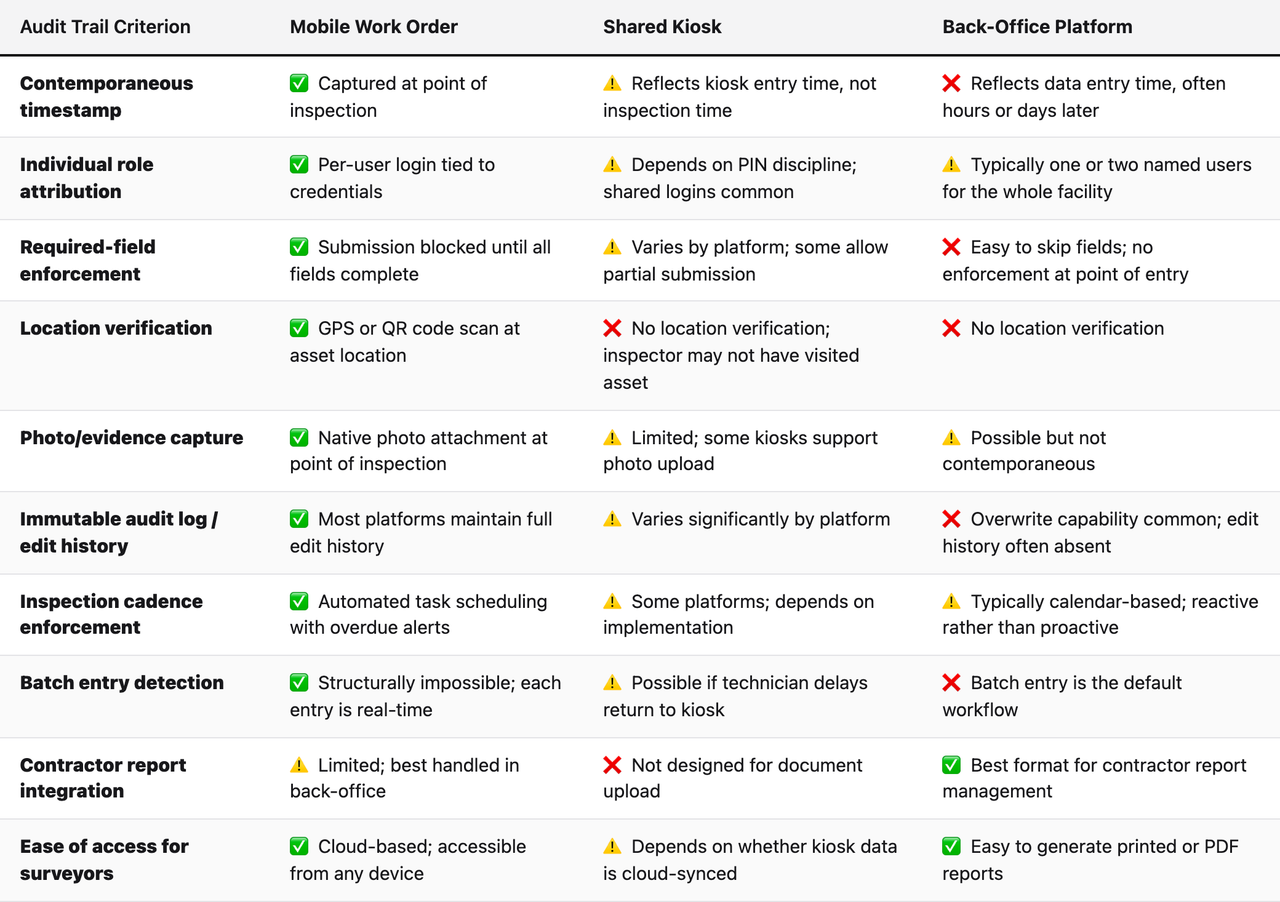
Head-to-Head Comparison: CMS Audit Trail Criteria
The table below evaluates each logging format against the specific criteria CMS surveyors apply when reviewing SNF life safety documentation. These criteria are drawn from the State Operations Manual Appendix Z, NFPA 101 testing and inspection documentation requirements, and the patterns most commonly cited in K-tag deficiencies.
The Documentation Gap That Produces Most K-Tag Citations
Understanding which logging format produces the strongest audit trail requires understanding the specific documentation patterns that generate citations, because the goal is not documentation for its own sake. It is preventing citations that affect Five-Star ratings, trigger revisit surveys, and in the most serious cases, threaten participation in Medicare and Medicaid programs.
Generator Test Records: The Most Cited Life Safety Documentation Gap
Generator testing documentation is among the most frequently cited life safety deficiencies in SNF surveys. The NFPA 110 standard for emergency power systems requires monthly load testing with specific data points recorded: date, time, duration, load in kilowatts, voltage, frequency, oil pressure, coolant temperature, and any abnormalities observed. Every one of those fields must be present in every monthly record.
Back-office platforms fail this requirement most often because the technician who ran the test does not always remember every data point when entering records hours later. Kiosk systems fail it when the technician abbreviates the entry after a long walk back from the mechanical room. Mobile platforms, with required-field enforcement and the ability to enter data while standing at the generator, produce the most complete records, because the format forces completeness at the moment when the technician has all the information in front of them.
Fire Drill Documentation: The Shift Coverage Problem
Fire drill documentation has its own specific citation pattern. CMS requires that fire drills occur on each shift, day, evening, and night, at least once per quarter, with specific documentation requirements for each drill. The night-shift drill is the most commonly missing or incompletely documented, because night-shift staff have fewer supervisory resources and the drill is harder to observe.
A mobile work order system that assigns the night-shift fire drill as a required task, pushes it to the designated night-shift lead's device, and requires completion with a minimum set of fields (time, staff count, observations) before the task closes, produces night-shift documentation that is structurally as strong as day-shift documentation. A back-office system where the night-shift lead writes notes on a paper form and a day-shift administrator enters them the next morning produces a record that looks exactly like reconstructed documentation, because it is.
Sprinkler Deficiency Tracking: The Reconciliation Gap
When a sprinkler contractor visits a facility for the annual inspection and identifies deficiencies, the contractor's report becomes part of the facility's life safety documentation record. CMS surveyors look for evidence that identified deficiencies were tracked to resolution, that the facility acknowledged the finding, created a corrective action plan, and documented when the deficiency was resolved or mitigated.
This is where back-office platforms have a legitimate structural advantage: they can store contractor reports, attach corrective action notes, and track resolution status in a way that mobile or kiosk tools are not designed to do. However, the resolution documentation, the follow-up inspection confirming that a sprinkler head was replaced, for example, should be logged contemporaneously via mobile at the point of the corrective inspection. The strongest audit trail for sprinkler deficiency management is a hybrid: contractor report management in back-office, corrective action inspections logged via mobile.
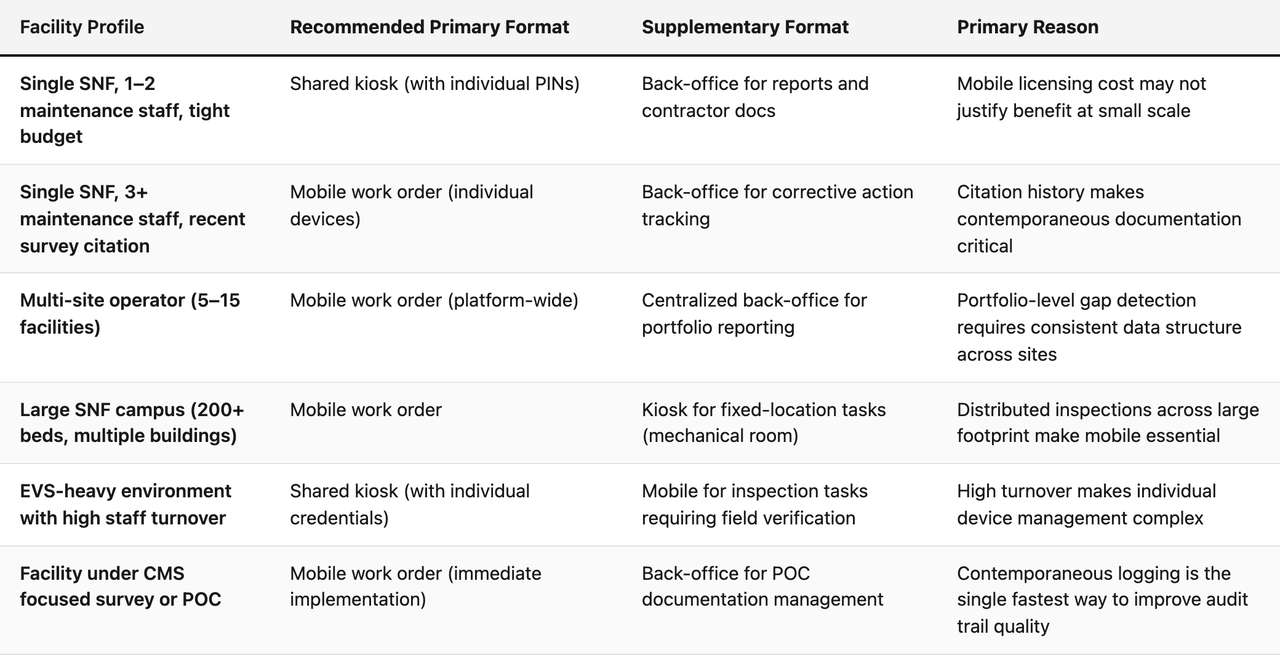
The SNF Documentation Format Decision Matrix
Choosing the right logging format for a specific facility or operator type is not a one-size-fits-all decision. The following framework maps facility characteristics to logging format recommendations, based on the CMS audit trail criteria analyzed above.
How AI-Powered Documentation Review Changes the Calculus
The comparison above focuses on logging format as a static question: which tool produces the strongest record at the moment of documentation. But the modern compliance environment has introduced a second layer of documentation intelligence that changes how the logging format decision should be evaluated.
AI-powered documentation review systems, like the analytic layer built into platforms such as SEQURA, do not just store records. They read them. They cross-reference inspection logs against the regulatory expectations for each asset type, identify patterns that signal documentation gaps, and surface those gaps before a surveyor arrives. Missing kW readings across three consecutive monthly generator logs. Fire drill records that show the same staff member listed for every night-shift drill (suggesting the drill may not have involved the full shift team). Sprinkler deficiency records that were closed without a confirming inspection entry.
Why Logging Format Determines AI Review Effectiveness
An AI review system is only as good as the data it has to work with. If the underlying records were entered in a back-office batch, the AI can detect the batch pattern but cannot verify that the inspections were actually performed as recorded. If kiosk records lack individual attribution, the AI can flag that a required inspection was completed but cannot confirm who performed it or whether that person was qualified.
Mobile work order records, captured contemporaneously with individual attribution and required-field enforcement, give an AI review system the richest dataset to analyze. The system can detect not just missing records, but suspicious patterns in completed records, entries that look contemporaneous but have anomalous metadata, inspections completed suspiciously quickly for the scope of work described, or findings that never escalate to corrective action despite being marked as deficiencies.
This is the difference between documentation management and documentation intelligence. The first stores records. The second audits them the way a surveyor would, before the surveyor arrives. For that second capability to function, the underlying logging format must produce records with enough granularity to audit.
The Pre-Survey Gap Detection Advantage
Facilities that combine mobile logging with AI documentation review gain a specific operational advantage: the ability to find their own gaps. A maintenance director who receives a weekly alert that three K027 generator test records from the past six months are missing kW load readings can correct those records or document the corrective action before a survey. A maintenance director running a back-office platform without AI review has no systematic way to find those gaps until a surveyor finds them first.
The regulatory stakes of this distinction are significant. CMS citation rates for life safety deficiencies remain elevated across the SNF sector, and the CMS life safety survey program has increased its focus on documentation quality as a proxy for care quality. A facility that can demonstrate a proactive documentation review process, not just a logging system, but an auditing system, is in a structurally different position during a survey than one that can only produce records on demand.
The Hybrid Architecture: How Leading SNF Operators Actually Document
The framing of this comparison as a three-way choice between mobile, kiosk, and back-office is useful for analysis but does not reflect how the best-documented SNF facilities actually operate. The facilities with the strongest audit trails use a hybrid architecture that assigns each documentation function to the format best suited to it.
The Three-Layer Hybrid Model
Layer one is mobile: all field inspections, recurring compliance tasks, and real-time condition reporting are logged via mobile at the point of inspection. The mobile platform is the source of truth for contemporaneous documentation. It captures the timestamp, the inspector identity, the required fields, and any photos or notes relevant to the inspection.
Layer two is kiosk: fixed-location tasks, contractor sign-ins, shift handoff acknowledgments, and EVS compliance checks that occur at or near a fixed point in the facility are logged via kiosk. The kiosk supplements mobile rather than replacing it, handling the workflow where a fixed terminal is more efficient than a personal device.
Layer three is back-office: contractor report management, corrective action tracking, compliance report generation, and portfolio-level administrative functions are handled through a back-office platform. The back-office layer does not create primary inspection records, it manages, aggregates, and reports on records created by mobile and kiosk.
Critically, all three layers feed into a single database that enables the AI review layer to analyze the full documentation picture. The value of the hybrid architecture is not just operational efficiency, it is the ability to detect cross-layer gaps. A mobile record showing a sprinkler deficiency that was never followed by a back-office corrective action record. A kiosk record showing a contractor sign-in for a fire alarm test that has no corresponding contractor report in the back-office layer. These cross-layer patterns are invisible when logging formats are siloed.
Implementation Sequence for Facilities Transitioning from Paper
For facilities moving from paper binders to a hybrid digital architecture, the implementation sequence matters. Starting with back-office digitization first, scanning paper records into a digital system, is the most common approach, but it is also the least effective for improving audit trail quality. It produces a digital version of the same documentation gaps that existed on paper.
The higher-impact sequence starts with mobile. Deploy mobile work order management for the highest-risk inspection categories first: generators, fire alarms, sprinkler systems, and fire drills. These are the inspection types that produce the most citations and have the most specific documentation requirements. Once mobile logging is established for those categories, the audit trail quality improvement is immediate and measurable. Add kiosk for EVS and fixed-location tasks next. Integrate back-office for contractor report management last.
CMS Documentation Format: What the Record Must Prove
The CMS documentation format question ultimately comes down to a single test: does the record prove what it claims to prove? Not just that an inspection happened, but that the right person performed it, at the right time, with the right findings recorded, in a format that would survive adversarial scrutiny from a trained surveyor.
The logging format determines whether that proof exists. A paper log signed by a technician proves almost nothing under adversarial review, the signature could have been added later, the date could have been written in retrospect, and the required fields may or may not be present. A back-office record with a digital timestamp proves when data was entered but not when the inspection occurred. A kiosk record proves a record was submitted from a fixed terminal but may not prove who submitted it or where the underlying inspection took place.
A mobile work order record, captured on a device in the possession of an identified user, at the time of inspection, with GPS or QR verification of location, required fields enforced, and an immutable edit history, produces the most complete proof available from any non-paper format. That is why mobile work order management is the strongest structural match to CMS audit trail requirements.
It is also why the format decision cannot be separated from the platform decision. A mobile work order application without required-field enforcement, without individual user attribution, or without an immutable audit log does not deliver the structural advantages described above. The format enables the audit trail quality. The platform determines whether the format delivers on that potential.
Frequently Asked Questions
What does "contemporaneous" mean in CMS documentation standards?
Contemporaneous documentation means the record is created at the time the inspection or activity occurs, not reconstructed from notes or memory afterward. CMS surveyors look for timestamp patterns that confirm entries were made in real time. A mobile work order submitted while the technician is standing at the inspected asset is contemporaneous. A back-office entry made at end-of-shift covering work done that morning is not, even if the information is accurate.
Can a shared kiosk system produce a defensible CMS audit trail?
Yes, but only under specific conditions: individual user credentials (not shared PINs), kiosk placement near or at the inspection asset rather than in a central office, required-field enforcement, and cloud synchronization with an immutable record. Most shared kiosk deployments do not meet all four conditions, which is why kiosk systems occupy a middle position in audit trail strength rather than the top position.
What K-tags are most affected by logging format choice?
K-tags related to generator testing (K918, K919), fire alarm system testing (K341, K346), sprinkler system inspection and maintenance (K351, K353), fire drill documentation (K712, K714), and portable fire extinguisher maintenance (K355) are the categories where logging format most directly affects citation risk. These are all inspection types with specific, field-level documentation requirements that back-office and kiosk logging frequently leave incomplete.
Does mobile work order management require each technician to have their own device?
Individual devices are the strongest implementation from an attribution standpoint, but shared mobile devices with individual login credentials also work. The key is that each inspection record is submitted under the credentials of the person who performed the inspection, not under a shared facility login. Some platforms support NFC badge-tap authentication that makes individual credential management practical even on shared devices.
How does AI documentation review interact with logging format?
AI review systems analyze the content and metadata of inspection records to identify gaps and anomalies. The richer the underlying record, more fields, individual attribution, contemporaneous timestamps, location data, the more effectively an AI system can detect documentation problems. Mobile records provide the richest dataset for AI analysis. Back-office batch entries provide the least, because the metadata patterns that signal problems (batch timestamps, missing fields) are also the most common features of legitimate back-office workflows.
What is the biggest documentation mistake SNF maintenance directors make?
The most common mistake is treating documentation as a retrospective activity, something done after inspections are complete, rather than as an integrated part of the inspection workflow. This mindset produces the batch entry pattern that signals reconstructed documentation to surveyors. The solution is not working harder at documentation; it is adopting a logging format (specifically mobile) that makes contemporaneous entry the path of least resistance.
How should contractor inspection reports be integrated into the compliance record?
Contractor reports should be received, reviewed, and filed in a back-office platform where deficiencies can be tracked to resolution. Each identified deficiency should generate a corrective action work order logged in the mobile system, so that the follow-up inspection is documented contemporaneously when it occurs. The strongest audit trail connects the contractor's finding (back-office), the corrective work order (mobile), and the verification inspection (mobile) into a single traceable thread.
Is it acceptable to scan paper inspection records into a digital system?
Scanned paper records are better than unscanned paper records in terms of accessibility and disaster recovery, but they do not improve audit trail quality. A scanned paper log with missing fields and no individual attribution is still a weak record, it is just a digitized version of a weak record. The audit trail improvement comes from changing the logging format going forward, not from digitizing historical paper records.
What should a facility look for when evaluating mobile work order platforms for CMS compliance?
The five most critical features for CMS audit trail strength are: (1) required-field enforcement that blocks submission of incomplete records; (2) individual user authentication tied to each record; (3) automated timestamp capture that is not editable by the submitting user; (4) an immutable edit history that logs all changes with the identity of the editor; and (5) inspection cadence scheduling that pushes overdue task alerts before the due date passes. Platforms that lack any of these features produce structurally weaker audit trails regardless of their other capabilities.
How do multi-site SNF operators benefit from standardizing on a single logging format?
Standardization across sites enables portfolio-level gap detection that is impossible when each facility uses a different logging format or platform. A regional operator who can see, from a single dashboard, that one facility has not completed a generator test in six weeks and another has a pattern of night-shift fire drill documentation gaps is in a fundamentally different survey readiness position than one who must call each maintenance director individually to assess documentation status. The logging format is not just a facility-level decision, it is an organizational risk management decision.
What role does the SNF maintenance director play in logging format selection?
The maintenance director is the most important voice in the logging format decision because they understand the operational realities of the facility: the physical layout, the staffing patterns, the connectivity challenges, and the inspection workflows. A logging format that looks optimal on paper but creates friction for maintenance staff will be worked around, technicians will find ways to batch-enter records or share credentials. The best logging format is the one that makes contemporaneous, complete documentation the easiest path for the people doing the work.
Does SEQURA support all three logging formats?
SEQURA is designed to support contemporaneous inspection logging via facility kiosk, mobile, and back-office computer, with all three feeding into a single compliance record that the AI review layer can analyze for documentation gaps. The platform's task template library is built around NFPA 101, NFPA 99, and CMS Conditions of Participation, so the inspection cadence and required fields are pre-configured for each K-tag category rather than requiring the facility to build their own compliance framework from scratch.
Key Takeaways
- Mobile work order management produces the strongest CMS audit trail because it captures contemporaneous timestamps, individual role attribution, required-field enforcement, and location verification at the point of inspection, the four structural properties that matter most to surveyors.
- Shared kiosk compliance logging is defensible but structurally vulnerable when kiosks are centrally located rather than positioned near inspection assets, when shared credentials replace individual attribution, and when technicians enter records after returning from distributed inspections rather than at the point of work.
- Back-office platforms should not be used as primary inspection logging tools, they produce batch-entry patterns that signal reconstructed documentation. Their legitimate role is contractor report management, corrective action tracking, and compliance report generation.
- The hybrid three-layer architecture, mobile for field inspections, kiosk for fixed-location tasks, back-office for administrative documentation, produces the strongest overall audit trail when all three feed into a single database.
- AI documentation review is most effective when built on mobile logging, because contemporaneous records with rich metadata give the AI system enough granularity to detect documentation gaps before a surveyor finds them.
- The logging format decision is an organizational risk management decision, not just a technology procurement decision. For multi-site operators, standardizing on a consistent logging format across facilities enables portfolio-level gap detection that is impossible with fragmented documentation systems.
- The contemporaneous standard is non-negotiable. Whatever logging format a facility adopts, the test is whether the resulting record proves the inspection happened at the time it claims, performed by the person it names, with the findings it reports. Format determines whether that proof exists.
About the author
Benjamin Terebelo · Founder
Benjamin is the founder of SEQURA, a compliance platform purpose-built for healthcare facilities. He builds at the intersection of healthcare operations and software, maintaining a focus on bringing modern tooling to systems that the broader industry has largely left behind.
About the author
Benjamin Terebelo · Founder
Benjamin is the founder of SEQURA, a compliance platform purpose-built for healthcare facilities. He builds at the intersection of healthcare operations and software, maintaining a focus on bringing modern tooling to systems that the broader industry has largely left behind.